Passphrases and sign-in
What Is Two-Factor Authentication?
Two-factor authentication adds a second proof to your password. Compare security keys, passkeys, authenticator apps, push and SMS, and set up recovery.
Two-factor authentication in one paragraph
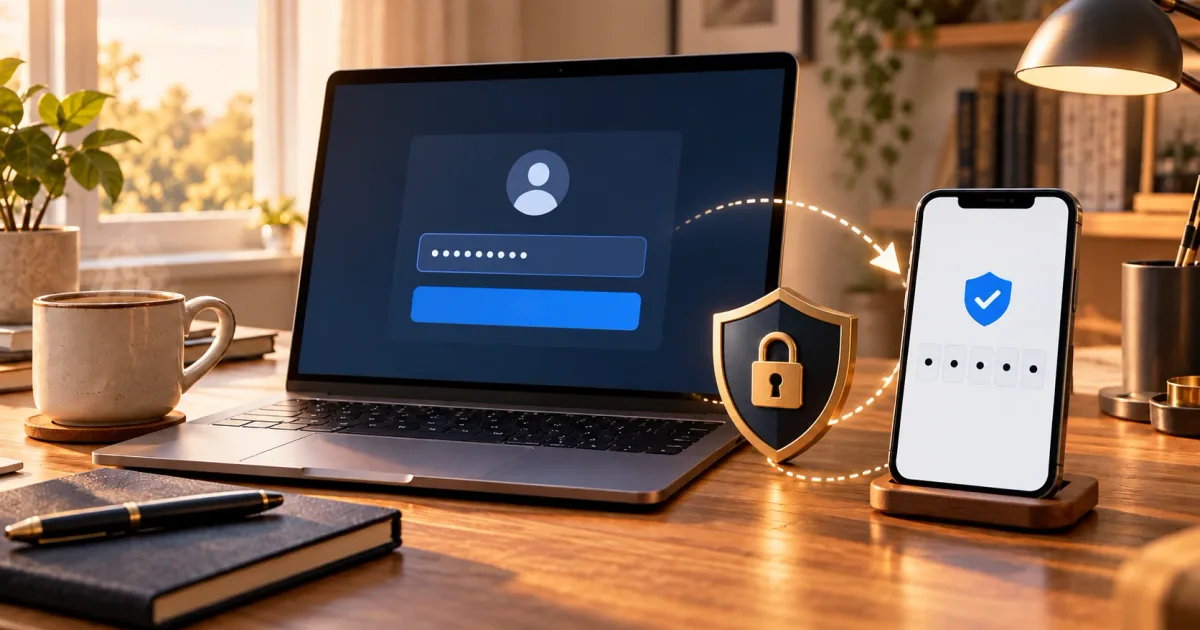
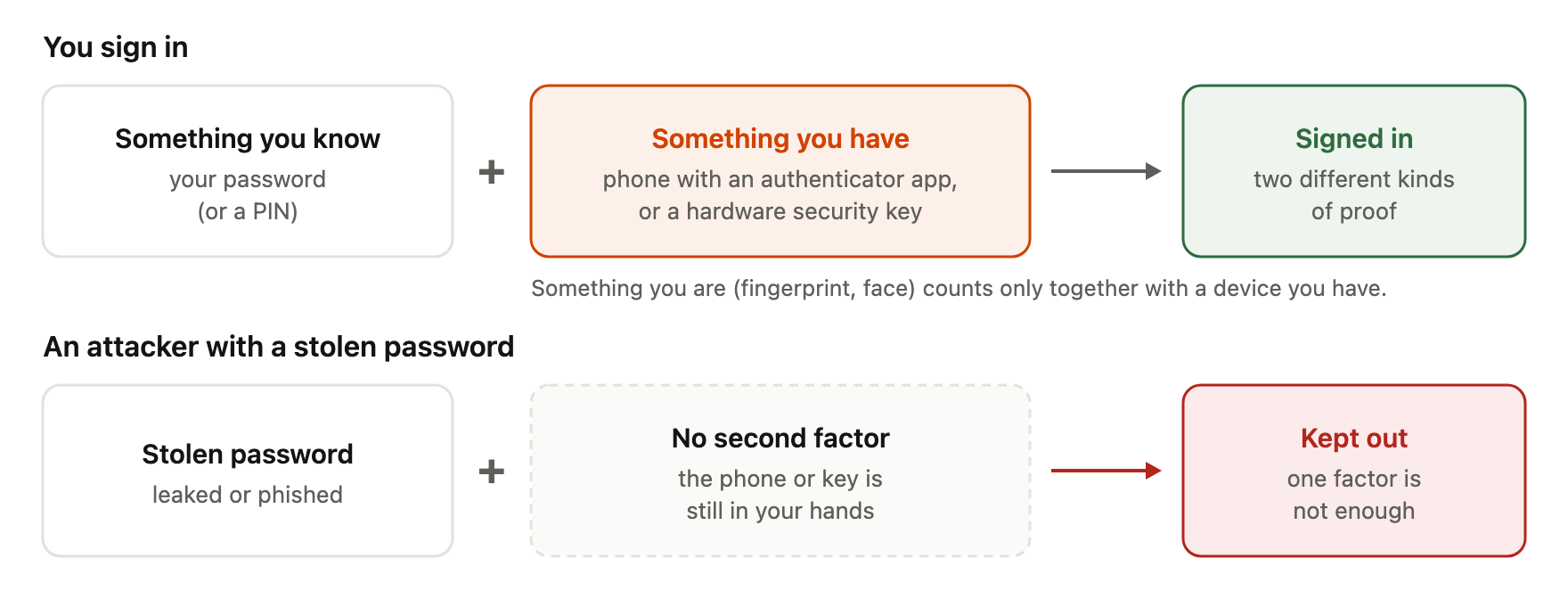
Two-factor authentication (2FA) means a service asks for two different kinds of proof before it lets you in. The usual pair is a password plus something on a device you own. For example, you type your password, then enter a six-digit code from an app on your phone. If someone steals only your password, they still cannot sign in without the second factor. CISA describes this as the main benefit: when one factor is compromised, an attacker who cannot provide the second factor is still kept out [1].
The same idea as a picture - two different kinds of proof get you in, a stolen password alone does not:
The three authentication factors
Security standards group proofs into three kinds of factor:
Something you know. A secret in your memory. NIST SP 800-63B says a password "is 'something you know'" [2]. A PIN belongs here too.
Something you have. A physical object or device, such as a phone with an authenticator app, a hardware security key, or a printed list of recovery codes. NIST calls a look-up secret, such as a recovery code list, "something you have" [2].
Something you are. A biometric, such as a fingerprint or face scan. NIST does not accept a biometric as an authenticator by itself; it must be used together with a physical authenticator [2]. That is why your phone's fingerprint reader unlocks a key stored on the phone, rather than being sent to the website.
2FA vs MFA
Multi-factor authentication (MFA) means using two or more different factors. NIST defines it as proof of possession and control of two distinct authentication factors [2]. 2FA is simply MFA with exactly two factors.
The word "different" is important. A password plus a second password, or a password plus a security question, is two things you know. OWASP states that multiple instances of the same factor, such as a password and a PIN, do not constitute MFA [3].
Methods of second factor
Authenticator apps and TOTP
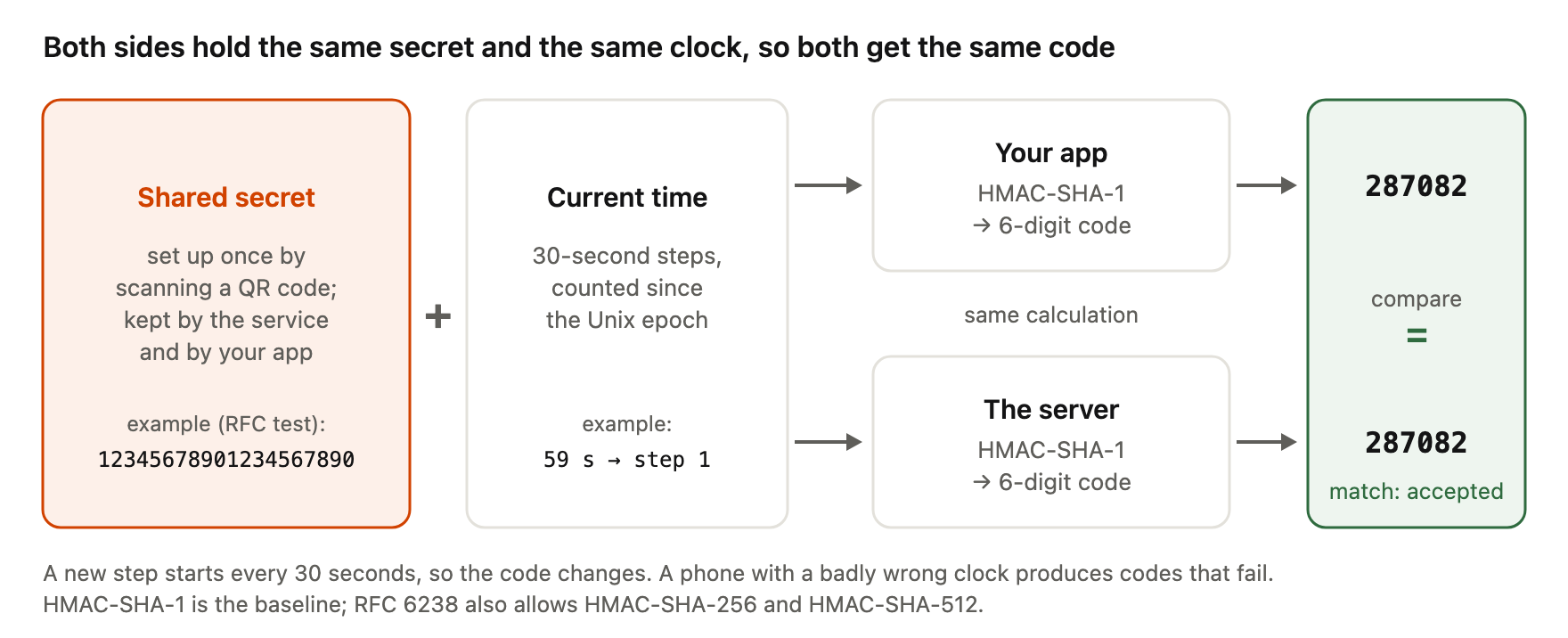
Most authenticator apps use TOTP, the Time-Based One-Time Password algorithm in RFC 6238 [4]. When you enable it, the service shows a QR code. The QR code contains a secret key that is now shared by the service and your app; both sides must hold the same secret [4].
To make a code, the app combines the secret with the current time, counted in 30-second steps by default [4]. The server does the same calculation and compares. This is why codes change every 30 seconds, and why a phone with a badly wrong clock can produce codes that fail. RFC 6238 also allows HMAC-SHA-256 and HMAC-SHA-512, although HMAC-SHA-1 is the baseline [4]. To watch this calculation with a test secret, try the TOTP generator: it makes the same codes in your browser and shows the QR code an app would scan.
Here is that calculation with the test secret from RFC 6238, done by your app and by the server side by side:
TOTP works offline and does not depend on your phone number. Its weakness is that you type the code by hand, so a fake login page can ask for it and pass it on to the real site within the time window. CISA's phishing example is exactly this: the user enters username, password and the six-digit code from an authenticator app on a copycat site [1].
SMS and voice codes
With SMS 2FA, the service texts you a code. It is easy to set up and works on almost any phone. It also has specific weaknesses. CISA lists SIM swap, where an attacker convinces a mobile carrier to move your number to their SIM card, and exploitation of SS7, the signalling system between phone networks, to intercept codes sent by SMS or voice [1].
NIST SP 800-63B Revision 4 classifies authentication through the public phone network (PSTN), which includes SMS, as "restricted". It says services SHOULD check risk signals such as a SIM change, number porting or device swap before relying on it [2]. CISA calls SMS or voice MFA a last-resort option, while noting it can serve as a temporary step towards stronger MFA [1].
Push notifications, push bombing and number matching
Push-based 2FA sends a prompt to an app on your phone: "Is this you signing in?" You tap Approve or Deny. It is convenient, but it invites a specific attack. In push bombing, also called push fatigue, an attacker who already has your password sends prompt after prompt until you press Accept [1]. NIST says services that send push notifications SHOULD limit how many they send since the last successful sign-in [2].
Number matching adds a step. The sign-in page shows a number, for example 47, and the app asks you to type that number before approving. A random prompt you did not start has no number on your screen to match. CISA describes number matching as a mitigation for systems that are not yet phishing-resistant, and rates push with number matching as resistant to push bombing [1].
Hardware security keys (FIDO/WebAuthn)
A hardware security key is a small USB, NFC or Bluetooth device that holds cryptographic keys. It uses FIDO2 and WebAuthn, a W3C standard that lets websites create and use public-key credentials that are "scoped" to a particular website, called the relying party [5].
When you register a key, it creates a new key pair for that site. The site stores only the public key. When you sign in, the key signs a challenge, and the browser includes the website's origin in what is signed. A credential for example.com will not work for a look-alike domain such as examp1e.com, so a fake site cannot collect a usable answer. There is also no code for you to copy into the wrong place.
CISA calls FIDO/WebAuthn "the only widely available phishing-resistant authentication" and notes authenticators can be separate "roaming" tokens or "platform" authenticators built into laptops and phones [1].
Passkeys
The FIDO Alliance defines a passkey as "an authentication credential based on FIDO standards, stored on your phone, computer, or hardware security key" [6]. It uses the same public-key method as a security key, so it is also bound to the website or app it was created for [6].
There are two kinds. Device-bound passkeys stay on one device, such as a hardware key. Synced passkeys are copied between your devices through a provider's cloud service; FIDO says this syncing is end-to-end encrypted [6]. NIST calls synced credentials "syncable authenticators", accepts them, and says they SHALL NOT be used at its highest assurance level, AAL3 [2].
A passkey often replaces the password entirely: the device you hold plus your fingerprint, face or device PIN make up the factors. A full explanation belongs in a separate guide.
What "phishing-resistant" means
NIST defines phishing resistance as the ability of an authentication protocol to prevent the disclosure of secrets and valid authenticator outputs to an impostor verifier, meaning a fake site or service [2]. It adds a clear rule: authenticators that involve manual entry of an output, such as OTP and out-of-band codes, SHALL NOT be considered phishing-resistant [2].
In practice, this means a TOTP code or SMS code is not phishing-resistant, however short-lived it is. FIDO security keys and passkeys are, because the browser binds the response to the real site's origin.
Ranking the methods
Not all 2FA methods give the same protection. CISA states this directly and publishes a table of MFA forms ordered from strongest to weakest [1]:
- Phishing-resistant MFA: FIDO/WebAuthn (security keys, passkeys) and PKI-based methods such as smart cards. Resistant to phishing; push bombing, SS7 and SIM swap do not apply.
- App-based OTP, token-based OTP, and push with number matching. Vulnerable to phishing, resistant to push bombing; SS7 and SIM swap do not apply.
- Push without number matching. Vulnerable to push bombing and user error.
- SMS or voice. Vulnerable to phishing, SS7 and SIM swap attacks.
Note that CISA places authenticator-app codes and push with number matching in the same tier. CISA also says any form of MFA is better than no MFA [1]. If SMS is the only option a service offers, using it is still better than a password alone.
Backup codes and account recovery
Most services give you backup codes when you turn on 2FA: a list of single-use codes for when your phone or key is lost. NIST describes saved recovery codes as look-up secrets that you store for use if another authenticator is lost or malfunctions [2].
Store them where you can reach them if your phone is gone, but not next to your password. A paper copy in a safe place, or a separate entry in a password manager protected by its own strong master password, are two options. If you use only an authenticator app, losing the phone also loses the TOTP secrets unless the app has a backup; OWASP notes that a phone that is lost, stolen or out of battery means the user cannot authenticate [3].
Recovery is where 2FA is often weakest. OWASP warns that processes letting users bypass or reset MFA "may be exploitable by attackers" [3]. If a support agent can remove 2FA after a short phone call, or if recovery falls back to an SMS code, an attacker will try that route instead of attacking the second factor. Our interpretation: when you choose methods, check what the recovery path is, and prefer services that let you register a second security key or passkey as a backup.
Common mistakes
Storing backup codes next to the password. If both are in the same note or file, one leak gives away both factors.
Approving a prompt you did not expect. A push request that appears while you are not signing in usually means someone has your password. Deny it, and change the password.
Typing a code into a page reached from an email link. A real-looking login page can forward your password and code to the real site in seconds. Open the site from a bookmark or by typing the address. Security keys and passkeys avoid this problem because they will not answer for the wrong domain.
Turning on 2FA and keeping a weak, reused password. The second factor is a backstop, not a reason to relax the first one.
Having no backup method. Register a second key, save backup codes, or both, before you need them.
Your password still matters
With most 2FA setups, the password is still the first factor. If it is reused or easy to guess, an attacker skips straight to the second factor and tries phishing, push bombing or account recovery. A unique random password removes that head start. You can create one with the Password Generator and check how guessable an existing one is with the Password Strength Checker.
Frequently asked questions
Is 2FA the same as MFA?
Are two passwords two-factor authentication?
No. Both are "something you know". OWASP says multiple instances of the same factor do not count as MFA [3].
Is SMS 2FA still worth using?
Are authenticator apps phishing-resistant?
What should I do if I get a 2FA prompt I did not request?
Deny it. It usually means someone knows your password, so change that password and review recent sign-ins.
Where should I keep backup codes?
Somewhere you can reach without your phone, and separate from your password, for example on paper in a safe place.
References
- CISA, Implementing Phishing-Resistant MFA (fact sheet), October 2022, https://www.cisa.gov/sites/default/files/publications/fact-sheet-implementing-phishing-resistant-mfa-508c.pdf — MFA purpose; not all MFA equally secure; phishing, push bombing, SS7, SIM swap; Table 1 strongest-to-weakest; number matching; FIDO/WebAuthn as the only widely available phishing-resistant method; roaming vs platform authenticators; SMS as last resort; any MFA better than none.
- NIST, SP 800-63B Revision 4: Digital Identity Guidelines — Authentication and Authenticator Management, August 2025, https://pages.nist.gov/800-63-4/sp800-63b.html — factor descriptions; MFA definition (sec. 2.2); biometrics not an authenticator alone; PSTN "restricted" and risk indicators (sec. 3.1.3.3); push rate limiting; phishing resistance definition and manual-entry rule (sec. 3.2.5); recovery codes as look-up secrets; syncable authenticators not at AAL3.
- OWASP, Multifactor Authentication Cheat Sheet, https://cheatsheetseries.owasp.org/cheatsheets/Multifactor_Authentication_Cheat_Sheet.html — same factor twice is not MFA; MFA bypass/reset processes may be exploitable; lost device risk for TOTP.
- D. M'Raihi, S. Machani, M. Pei, J. Rydell, RFC 6238: TOTP: Time-Based One-Time Password Algorithm, IETF, May 2011, https://www.rfc-editor.org/rfc/rfc6238 — shared secret; 30-second default time step; HMAC-SHA-1 baseline, SHA-256/512 allowed.
- W3C, Web Authentication: An API for accessing Public Key Credentials, Level 3, https://www.w3.org/TR/webauthn-3/ — public-key credentials scoped to a relying party.
- FIDO Alliance, Passkeys, https://fidoalliance.org/passkeys/ — passkey definition; synced vs device-bound; end-to-end encrypted sync; phishing resistance through binding to site or app.