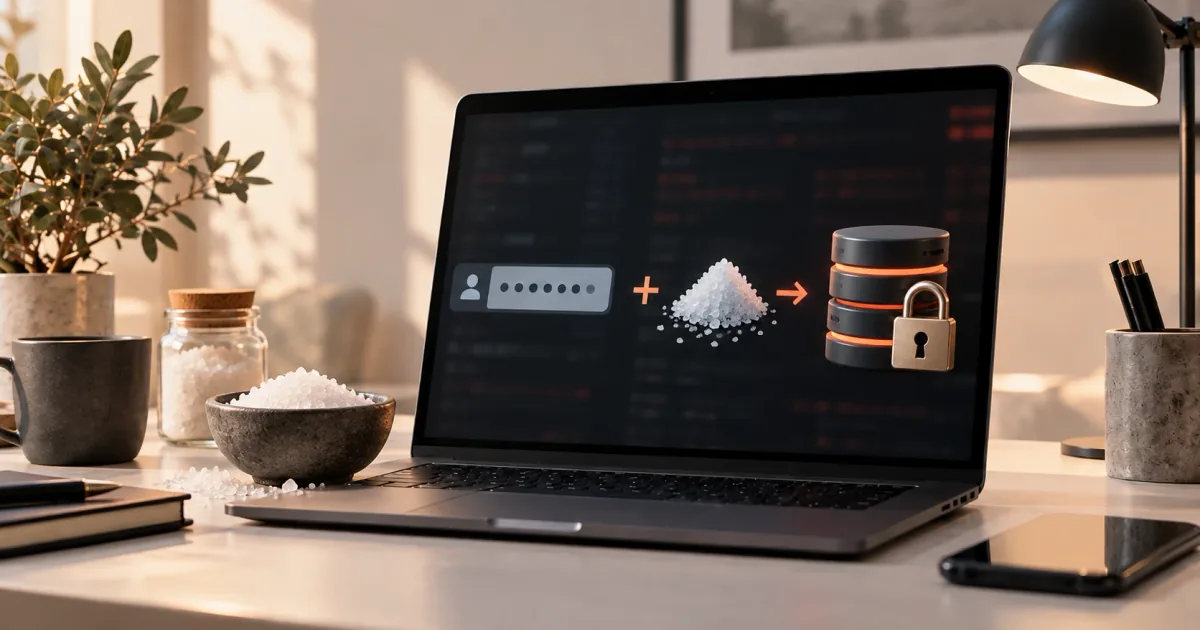
Hashing and password storage
Hashing vs Encryption
Hashing is one-way; encryption is reversible with a key. How SHA-256, AES and password hashing differ, and which to use for files, data and logins.

The short answer
Hashing turns data into a short, fixed-size fingerprint and cannot be reversed. Encryption scrambles data with a key so that someone with the right key can turn it back into the original. You use hashing to check that something has not changed, and encryption to keep something secret but still readable later.
Passwords need a third tool: a password hashing function. It is a hash, but one that is built to be slow and to use a unique random value for every password. Mixing these three up is one of the most common security mistakes in software.
What hashing is
A hash function takes an input of any length, such as one word or a 4 GB video, and produces an output of fixed length called a digest (also called a hash value). SHA-256, specified in the US federal standard FIPS 180-4, always produces a 256-bit digest, which is usually written as 64 hexadecimal characters [1].
FIPS 180-4 describes its algorithms as "one-way hash functions" [1]. One-way means you can easily compute the digest from the input, but you cannot compute the input from the digest. There is no key and no "decrypt" step. The standard calls these hashes secure because it is computationally infeasible to find a message that matches a given digest, or to find two different messages that produce the same digest [1]. The second property is called collision resistance. Older functions such as MD5 and SHA-1 have lost it; see MD5 vs SHA-1 vs SHA-256 for that history.
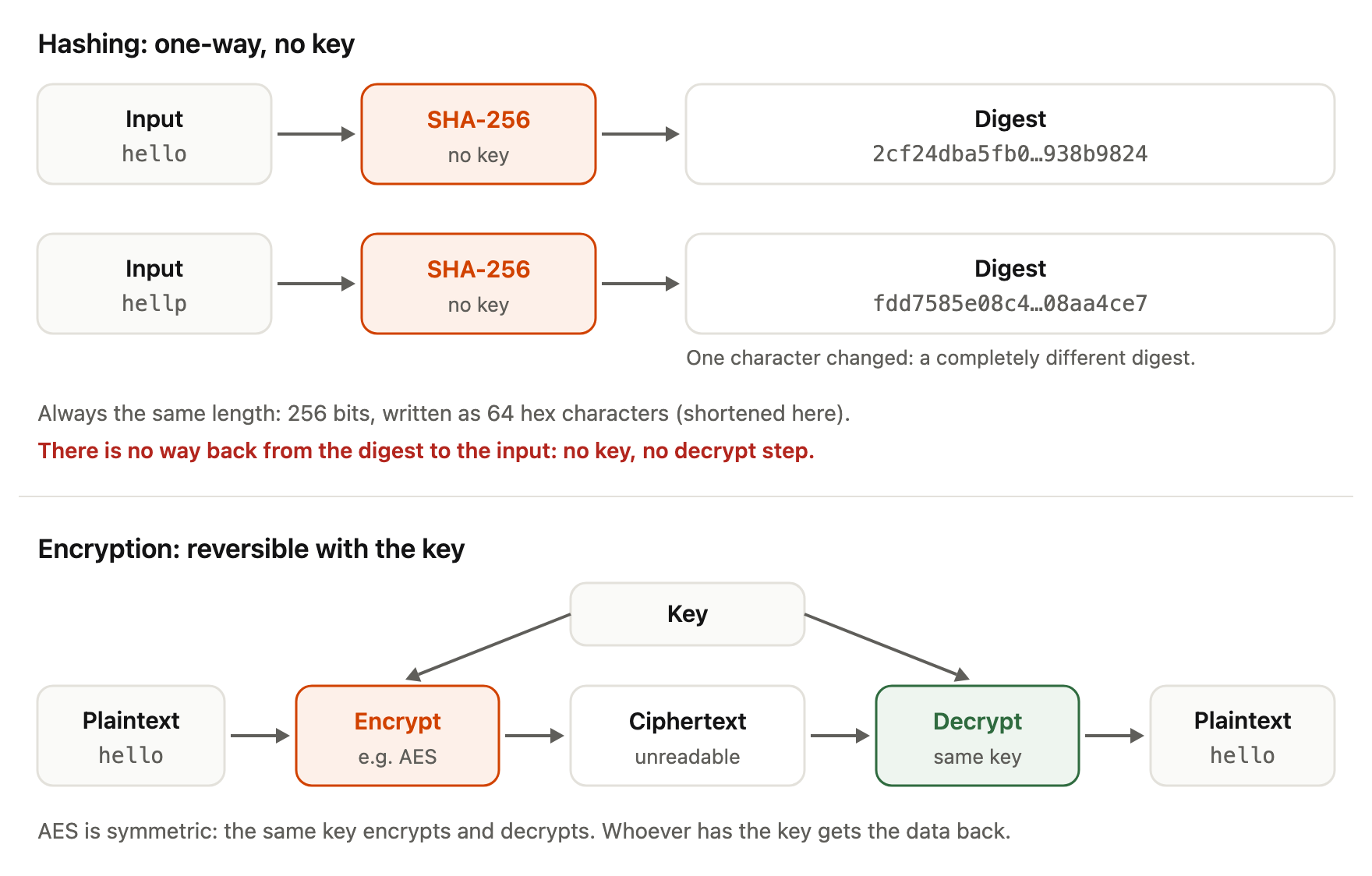
A hash is also deterministic: the same input always gives the same digest. A one-character change gives a completely different digest. FIPS 180-4 puts it this way: any change to a message will, with very high probability, result in a different message digest [1].
Example: a file checksum. A download page publishes the SHA-256 digest of an installer. After downloading, you compute the SHA-256 of your copy (for example with shasum -a 256 file.dmg on macOS). If the two digests match, your file is the same as the one the publisher hashed. Nothing here is secret. The point is integrity — detecting change — not confidentiality.
Note one limit: a checksum on the same page as the download only protects against accidental corruption. If an attacker can change the file, they can often change the published digest too. That problem is solved by digital signatures, covered below.
What encryption is
Encryption transforms readable data (the plaintext) into unreadable data (the ciphertext) using a key. Decryption uses a key to turn the ciphertext back into the plaintext. Encryption is reversible by design: the whole purpose is to get the original back later, but only for someone who holds the key.
AES, specified in FIPS 197, is a symmetric block cipher: the same key encrypts and decrypts, and the algorithm works on 128-bit blocks of data, with keys of 128, 192 or 256 bits [2]. NIST describes block ciphers as a foundation for services that protect the confidentiality of data [2]. (There is also asymmetric encryption, with a public key to encrypt and a private key to decrypt; the idea of reversibility with a key is the same.)
Example: HTTPS and disk encryption. When your browser loads a page over HTTPS, the connection is encrypted so that networks between you and the server cannot read it, yet the server can decrypt your request and answer it. Full-disk encryption on a laptop works on the same principle: if the laptop is stolen, the drive is ciphertext; when you unlock it, the system decrypts data as you use it. In both cases you need the original data back. That is the signal that encryption is the right tool.
The security of encryption depends on the key. If the key leaks, everything encrypted with it can be decrypted. This is why encryption creates a key-management problem that hashing does not have.
The diagram puts the two side by side: a hash goes one way without a key, while encryption can be undone by whoever holds the key.
Password hashing: a third category
A login system has an unusual requirement. It must check that you know your password, but it never needs to read your password again. So it should not be able to.
That rules out encryption. OWASP's Password Storage Cheat Sheet says passwords should be hashed with modern, adaptive algorithms "rather than encrypted or stored in plaintext", because hashing is a one-way function and therefore "the most appropriate approach for password validation" [4]. If a service stores passwords encrypted, anyone who obtains the key can recover every password at once.
It also rules out a plain general-purpose hash. SHA-256 is a good cryptographic hash, but it was designed to be fast, and that is the problem. In OWASP's words: "Fast hashing algorithms such as SHA-256 are not suitable for password storage because they allow attackers to perform large numbers of guesses quickly" [4]. If a database of SHA-256 password digests leaks, an attacker hashes candidate passwords at high speed and compares the results. How passwords get cracked explains those attacks.
Password hashing functions are hashes designed for exactly this job. They have three properties that general-purpose hashes lack:
- Deliberately slow. They have a work factor (also called a cost) that you can raise, so each guess costs the attacker real time.
- Salted. A unique random value, the salt, is mixed in for every password, so two users with the same password get different stored values.
- Often memory-hard. Some, like Argon2, also require a large amount of memory per guess, which makes specialised cracking hardware less effective. RFC 9106 defines Argon2 as a "memory-hard function for password hashing" [6].
The algorithms OWASP names are Argon2id (preferred), scrypt, bcrypt for legacy systems, and PBKDF2 where FIPS-140 compliance is required [4]. PBKDF2 is defined for NIST use in SP 800-132 [7]. How to choose parameters, add a pepper and migrate old hashes is covered in How Passwords Should Be Stored.
Example: a login. At sign-up, the server generates a salt, runs the password through Argon2id, and stores the salt, the parameters and the result. At login, it runs the submitted password through the same function with the stored salt and parameters, and compares. The original password is never stored and never recovered.
Digital signatures: a hash plus a private key
A digital signature combines hashing with asymmetric keys. FIPS 186-5 explains that a hash function is often used to obtain a condensed version of the data — the message digest — and that digest is input to the signature algorithm [3]. Signature generation uses a private key; verification uses the matching public key, which can be shared freely [3].
Signatures detect unauthorized changes to data and authenticate who signed it [3]. This solves the checksum problem above: an attacker can replace a file and its published digest, but cannot produce a valid signature without the signer's private key. This is the idea behind signed software downloads and updates.
A signature is not encryption of the message. The signed data can be completely public; the signature only proves origin and integrity.
Encoding (Base64) is neither
Encoding changes how data is represented so it can travel safely through systems that expect text. Base64, defined in RFC 4648, represents arbitrary bytes using letters, digits and a few symbols [5]. Anyone can decode it; there is no key and no secrecy.
RFC 4648 is explicit: base encoding "visually hides otherwise easily recognized information, such as passwords, but does not provide any computational confidentiality" [5]. A password stored as Base64 is effectively a password stored in plaintext. Encoding is still useful — password hashing formats often use Base64 to store the salt and digest as text — but it is never a security control by itself.
Comparison table
| Hashing (general-purpose) | Encryption | Password hashing | |
|---|---|---|---|
| Purpose | Detect changes; fingerprint data | Keep data confidential but recoverable | Verify a password without storing it |
| Reversible? | No (one-way) | Yes, with the key | No (one-way) |
| Uses a key? | No (HMAC variants add one) | Yes | No key; uses a per-password salt (optional separate pepper) |
| Speed by design | Fast | Fast | Deliberately slow, tunable cost |
| Output | Fixed-size digest (SHA-256: 256 bits) | Ciphertext, roughly input-sized | Encoded string with algorithm, parameters, salt and digest |
| Examples | SHA-256, SHA-3 | AES (FIPS 197) | Argon2id, scrypt, bcrypt, PBKDF2 |
| Typical use | File checksums, signatures, deduplication | HTTPS, disk encryption, encrypted backups | Storing user login passwords |
| Wrong use | Storing passwords with plain SHA-256 | Storing user passwords (key leak exposes all) | Hashing large files or data you need back |
Which one do I need?
Ask one question: do I ever need the original data back? If yes, you need encryption, and you need to protect the key. If no, you need a hash. Then ask a second question: is the input a password or another low-entropy secret that people choose? If yes, use a password hashing function, not a general-purpose hash. If the input is a file or message whose integrity you want to check, a general-purpose hash such as SHA-256 is the right tool, and a signature adds proof of who produced it.
One point applies to this site too. The password generator creates passwords in your browser; it does not hash, encrypt or store them, because nothing is sent to a server. How it works shows the details. How a password is protected after you type it into a website is the job of that website's storage design.
Frequently asked questions
Can a hash be decrypted?
No. A hash function has no key and no decryption step. FIPS 180-4 describes SHA-256 as a one-way function [1]. What attackers do instead is guess: they hash many candidate inputs and look for a match. That works against short or predictable inputs such as weak passwords, which is why passwords need a slow, salted password hashing function.
Is SHA-256 encryption?
Is SHA-256 safe for storing passwords?
Not on its own. OWASP says fast hashes such as SHA-256 "are not suitable for password storage" because they allow very fast guessing [4]. Use Argon2id, scrypt, bcrypt or PBKDF2 with suitable parameters; see How Passwords Should Be Stored.
Why not encrypt passwords so that users can get them back?
Because anyone who gets the key can then read every password. OWASP recommends hashing "rather than encrypted or stored in plaintext" and limits encryption to rare edge cases where the original password is truly needed, such as authenticating to a legacy system that offers no modern alternative [4]. A forgotten password should be reset, not recovered.
Is Base64 a form of encryption?
No. It is an encoding. RFC 4648 states that base encoding "does not provide any computational confidentiality" [5]. Anyone can decode it.
Is a digital signature the same as encrypting with a private key?
It is better to think of it separately. A signature is generated with a private key, usually over a hash of the data, and verified with the public key [3]. Its job is proving integrity and origin, not hiding content.
References
- NIST, FIPS 180-4: Secure Hash Standard (SHS), August 2015, https://csrc.nist.gov/pubs/fips/180-4/upd1/final (full text: https://nvlpubs.nist.gov/nistpubs/FIPS/NIST.FIPS.180-4.pdf) — SHA-256 specification; "one-way hash functions"; computational infeasibility of finding a message for a digest or a collision; any change gives a different digest; use with digital signatures and MACs.
- NIST, FIPS 197: Advanced Encryption Standard (AES), November 2001, updated May 2023, https://csrc.nist.gov/pubs/fips/197/final — AES is a symmetric block cipher; 128-bit blocks; 128/192/256-bit keys; block ciphers underpin confidentiality.
- NIST, FIPS 186-5: Digital Signature Standard (DSS), 3 February 2023, https://csrc.nist.gov/pubs/fips/186-5/final (full text: https://nvlpubs.nist.gov/nistpubs/FIPS/NIST.FIPS.186-5.pdf) — signatures detect unauthorized modification and authenticate the signatory; private key generates, public key verifies; a hash function is often used to produce the message digest that is signed.
- OWASP, Password Storage Cheat Sheet, accessed 6 October 2026, https://cheatsheetseries.owasp.org/cheatsheets/Password_Storage_Cheat_Sheet.html — hash rather than encrypt passwords; hashing is one-way; SHA-256 unsuitable for password storage; encryption only in edge cases; recommended algorithms.
- S. Josefsson, RFC 4648: The Base16, Base32, and Base64 Data Encodings, October 2006, https://www.rfc-editor.org/rfc/rfc4648 — Base64 represents arbitrary octets; base encoding provides no computational confidentiality (sec. 12).
- A. Biryukov, D. Dinu, D. Khovratovich, S. Josefsson, RFC 9106: Argon2 Memory-Hard Function for Password Hashing and Proof-of-Work Applications, September 2021, https://www.rfc-editor.org/rfc/rfc9106 — Argon2 is a memory-hard function for password hashing.
- NIST, SP 800-132: Recommendation for Password-Based Key Derivation, Part 1: Storage Applications, December 2010, https://csrc.nist.gov/pubs/sp/800/132/final — PBKDF2 with salt and iteration count.