Attacks and password strength
How Passwords Get Cracked
Dictionary attacks, credential stuffing, spraying, online vs offline guessing, hashes and salts: how passwords are cracked and what actually stops it.
Almost every password attack is a guessing game. The attacker picks a candidate password, tests it, and moves on to the next one until something works. The differences between attacks are about which candidates the attacker tries, in what order, and where they test them. Once you understand those three things, most advice about passwords starts to make sense.
Online and offline attacks
The most important distinction is where the guesses are tested. It decides how many guesses an attacker can make, and therefore which passwords survive.
Online attacks: guessing against the live login
In an online attack, the attacker types (or, more often, scripts) guesses into the real login form or API. Example: a bot sends alice@example.com with password1, then password2, then qwerty, to a shop's sign-in page.
Every guess goes through the service, so the service can slow it down. NIST SP 800-63B, the US federal guideline for authentication, requires verifiers to limit consecutive failed attempts on one account to no more than 100 [1]. It also lists ways to reduce the risk of lockouts, such as bot-detection challenges, waiting periods that grow after each failure, and risk-based checks on IP address, location or request timing [1]. OWASP describes the same kind of controls as login throttling and account lockout [3].
The result: an online attacker gets a small number of guesses per account. That is enough to try the most common passwords, but not enough to search through long random ones.
Offline attacks: guessing against stolen hashes
In an offline attack, the attacker has already stolen a copy of the password database, for example after a breach. Well-run services do not store the passwords themselves. They store a hash of each one (more on that below). The attacker now guesses on their own hardware: take a candidate, hash it, compare the result with the stolen hash [4].
Nobody is there to rate-limit them. The only limits are their hardware, their time, and how expensive the hash function is to compute. NIST requires passwords to be salted and hashed with a suitable password hashing scheme precisely so that stored passwords are "resistant to offline attacks" [1].
This is why the same password can be fine in one situation and weak in another. A password that would take centuries to guess at 100 guesses per second might fall quickly to an attacker who can compute billions of fast hashes per second.
Hashes, salts and rainbow tables
A hash function turns any input into a fixed-length output that cannot be turned back into the input. Example: the service stores the hash of correct horse, not the words themselves. When you log in, it hashes what you typed and compares the two results. Hashing is not encryption: there is no key that "decrypts" a hash. See Hashing vs Encryption for the difference.
Not all hashes are equal for this job. OWASP warns that "fast hashing algorithms such as SHA-256 are not suitable for password storage because they allow attackers to perform large numbers of guesses quickly" [4]. Password hashing schemes such as Argon2id, scrypt or bcrypt are deliberately slow and use a configurable work factor, which "reduces the speed and/or increases the cost" of each guess for the attacker [4]. The details are in How Passwords Should Be Stored.
A salt is a random value generated for each password and stored next to its hash. Example: two users both choose sunshine, but each gets a different salt, so their stored hashes are different. NIST requires a salt of at least 32 bits [1].
Salts matter because of precomputation. Without salts, an attacker could hash millions of common passwords once, store the results, and then simply look up stolen hashes in that table. A rainbow table is a compact, space-saving form of such a precomputed table. OWASP notes that salting protects against "pre-computing hashes using rainbow tables or database-based lookups" [4]. With a unique salt per password, a precomputed table would have to be rebuilt for every salt, which removes its advantage. The attacker is pushed back to guessing each password separately.
The main attack methods
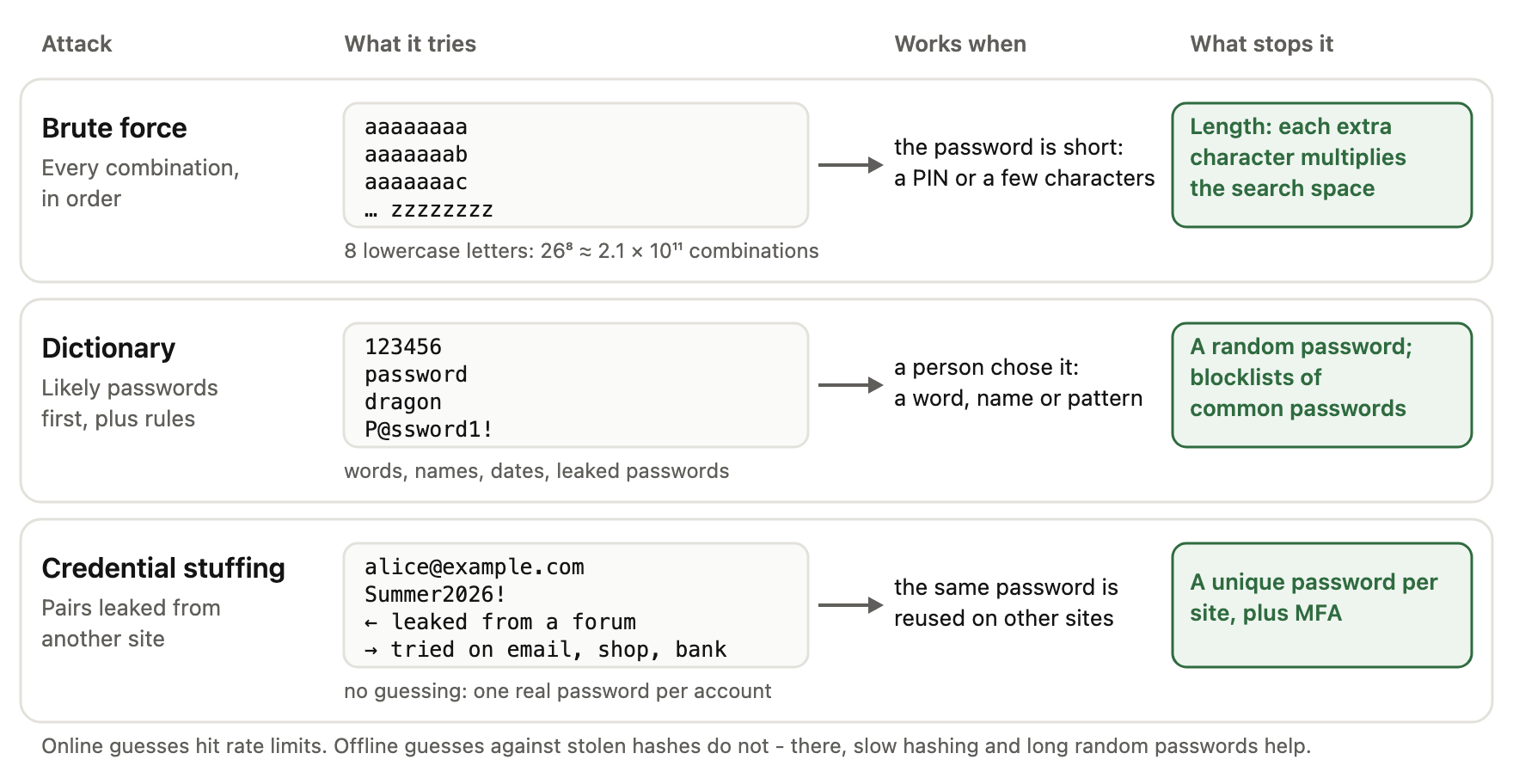
Three methods do most of the work. They differ in what they try, when they succeed and what stops them:
Brute-force attacks
A brute-force attack, in the strict sense, tries every possible combination in a defined space. Example: every lowercase string of 8 characters, from aaaaaaaa to zzzzzzzz. It needs no knowledge of the victim and is guaranteed to succeed eventually, but the number of candidates grows very fast with length.
Because exhaustive search is so expensive for long random passwords, real attackers rarely start with it. It is mostly used against short passwords or PINs. The full explanation, including search space and attacker limits, is in What Is a Brute-Force Attack?.
Dictionary attacks
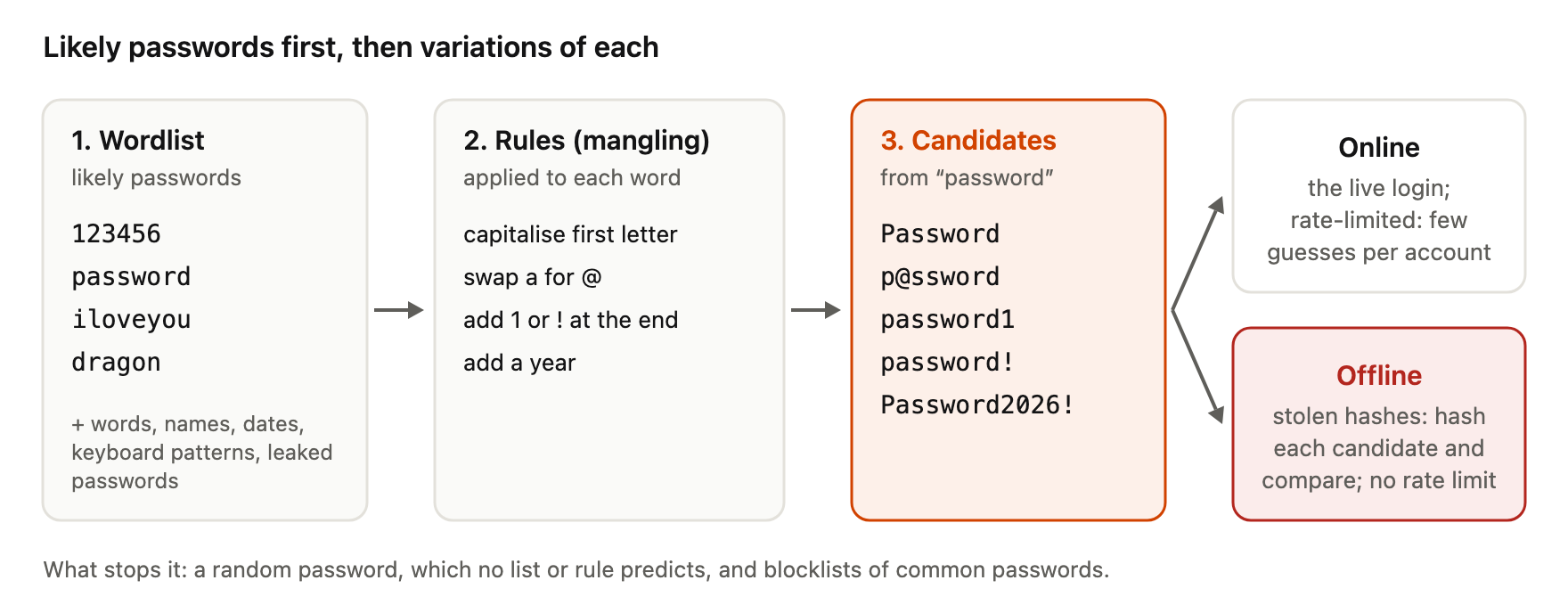
A dictionary attack tries a list of likely passwords instead of every combination. Example: 123456, password, iloveyou, dragon, then each of those with 1 or ! added at the end.
This is not the same as brute force. Brute force searches the whole space in a fixed order. A dictionary attack searches a tiny, well-chosen part of it first: words, names, dates, keyboard patterns, and passwords from earlier breaches. Modern cracking tools also apply rules (mangling) to each word, such as capitalising the first letter, swapping a for @, or adding a year.
Step by step, a dictionary attack turns a short list into many candidates:
Be aware that sources use the terms loosely. OWASP, for example, defines brute force as "testing multiple passwords from dictionary or other source against a single account" [2]. In this guide, "brute force" means exhaustive search and "dictionary attack" means guessing from a list.
Dictionary attacks work because human-chosen passwords are predictable. In a study of almost 70 million anonymised Yahoo! passwords, Joseph Bonneau estimated that they provided fewer than 10 bits of security against an online guessing attack and only about 20 bits against an optimal offline dictionary attack [6]. In plain terms: many people pick from the same small set of passwords, so a good list covers a large share of accounts.
Leaked password databases
Every large breach adds real passwords to the lists attackers use. Once a password has appeared in a breach, it is a known candidate, however complex it looks.
Defenders use the same data. NIST requires services to check new passwords against a blocklist that contains "commonly used, expected, or compromised passwords" [1]. OWASP recommends checking new passwords against breached password datasets, for example with a service like Pwned Passwords [2]. Our Password Strength Checker uses a similar idea locally: it estimates how many guesses a password would need, using dictionaries and patterns, and runs entirely in your browser.
Credential stuffing
Credential stuffing means "testing username/password pairs obtained from the breach of another site" [2]. Example: your email and password leak from a forum. An attacker then tries that exact pair on email providers, shops and banks.
No guessing is involved at all. The attack succeeds only when a person reuses the same password on more than one site. It also bypasses per-account rate limits, because each account receives one or two attempts, all of them with a password that was really used.
Password spraying
Password spraying is "testing a single weak password against a large number of different accounts" [2]. Example: an attacker tries Winter2026! once against each of 5,000 company accounts, then waits and tries Welcome1.
Spraying is designed to stay under lockout thresholds. Each account sees only a few failures, so a rule like "lock after 10 failed attempts" never triggers. It only finds accounts whose password is on the attacker's short list, which is why blocklists of common passwords are an effective defence.
What actually protects you
Unique passwords
Credential stuffing depends completely on reuse. If every account has a different password, a breach at one site exposes one account, not all of them. Uniqueness is the single habit that removes an entire attack class.
Longer passwords
For a randomly generated password, each extra character multiplies the number of possible passwords by the size of the character set. With 26 lowercase letters, going from 8 to 9 characters makes the search space 26 times larger. With 94 printable characters, each additional character makes it 94 times larger.
Length helps against brute force and offline attacks, where the attacker can make many guesses. It only helps against dictionary attacks if the extra length is not predictable. password123456 is long but appears early in every list. Length works best combined with randomness, for example a password from our password generator or a multi-word phrase from the passphrase generator. NIST now requires at least 15 characters for passwords used as a single factor [1].
To see how length and character set change the estimated search space, see how entropy affects estimated crack time. The Password Entropy Explained guide explains why that estimate only applies to randomly generated passwords.
Password managers
Unique, long, random passwords are hard to remember. A password manager solves this by generating and storing them for you, and by filling them in automatically. NIST requires verifiers to allow password managers and autofill, and says they should permit paste [1]. A site that blocks paste into the password field works against this.
A password manager also helps against phishing in a small way: autofill is tied to the website address, so it usually will not offer your bank password on a fake domain. Treat that as a helpful side effect, not a guarantee.
Multi-factor authentication
Multi-factor authentication (MFA) asks for a second proof, such as a code from an app or a security key, in addition to the password. CISA explains that even if an attacker compromises one factor like the password, they cannot meet the second requirement [5]. OWASP calls MFA "by far the best defense against the majority of password-related attacks" [2][3].
MFA does not make a weak or reused password acceptable, but it limits the damage when a password is guessed or leaked.
Frequently asked questions
Is a dictionary attack a type of brute-force attack?
It depends on who you ask. Strictly, brute force tries every combination and a dictionary attack tries a list of likely candidates. Some sources, including OWASP, use "brute force" for both. When reading security advice, check which meaning the author uses.
Can someone crack my password without access to the website's database?
Yes, through online guessing, credential stuffing or spraying against the login page. These attacks are limited by rate limiting and lockouts, so they mostly succeed against common or reused passwords.
If a site is breached, is my password exposed immediately?
Not necessarily. If the site used a slow, salted password hash, the attacker still has to guess each password offline. Common passwords will fall quickly; long random ones may hold up for a very long time. If a service tells you it was breached, change that password and any account where you reused it.
Do salts make weak passwords safe?
No. A salt stops precomputed tables and forces the attacker to attack each password separately. It does not slow down each individual guess. A weak password with a salt is still found early by a dictionary attack.
Are passwords with symbols always harder to crack?
Only when the symbols are random. P@ssw0rd! uses four character types, but cracking rules try that substitution pattern early. A long random password, with or without symbols, is the reliable option.
References
- NIST, SP 800-63B Revision 4: Digital Identity Guidelines — Authentication and Authenticator Management, final, August 2025, https://pages.nist.gov/800-63-4/sp800-63b.html — 100-attempt limit and anti-automation techniques (sec. 3.2.2); salting and hashing "resistant to offline attacks", 32-bit salt, blocklist, password managers/autofill/paste, 15-character minimum (sec. 3.1.1.2).
- OWASP Cheat Sheet Series, Credential Stuffing Prevention Cheat Sheet, accessed 2026-10-06, https://cheatsheetseries.owasp.org/cheatsheets/Credential_Stuffing_Prevention_Cheat_Sheet.html — definitions of brute force, credential stuffing and password spraying; MFA as primary defence; checking breached password datasets (Pwned Passwords).
- OWASP Cheat Sheet Series, Authentication Cheat Sheet, accessed 2026-10-06, https://cheatsheetseries.owasp.org/cheatsheets/Authentication_Cheat_Sheet.html — login throttling, account lockout, MFA as the best defence against most password attacks.
- OWASP Cheat Sheet Series, Password Storage Cheat Sheet, accessed 2026-10-06, https://cheatsheetseries.owasp.org/cheatsheets/Password_Storage_Cheat_Sheet.html — offline hash cracking process, fast hashes unsuitable, work factor, salting against rainbow tables.
- CISA, More than a Password (MFA), accessed 2026-10-06, https://www.cisa.gov/MFA — MFA blocks access even when one factor such as the password is compromised.
- Joseph Bonneau, The Science of Guessing: Analyzing an Anonymized Corpus of 70 Million Passwords, IEEE Symposium on Security and Privacy, 2012, https://www.jbonneau.com/doc/B12-IEEESP-analyzing_70M_anonymized_passwords.pdf — human-chosen passwords: fewer than 10 bits against online trawling, about 20 bits against an optimal offline dictionary attack.