Attacks and password strength
What Is a Data Breach?
What a data breach is, how data gets exposed, how attackers use leaked passwords, and a calm step-by-step checklist for what to do if your data is exposed.
The short answer
A data breach happens when information gets into the hands of someone who should not have it. Example: an online shop's customer database is copied by an outsider, and it contains names, email addresses and hashed passwords.
You usually cannot prevent a breach at a company you use. What you can control is how much damage it does to you. Unique passwords, a password manager and two-factor authentication turn a breach from "every account is at risk" into "one password needs changing".
What counts as a data breach
The official definition
US government glossaries define a breach broadly. The definition used by NIST, the US standards agency, covers "the loss of control, compromise, unauthorized disclosure, unauthorized acquisition" or any similar event where someone who is not authorised accesses, or could access, personal information [1]. It also counts a second case: an authorised person who accesses personal information for a purpose they are not allowed to [1].
Two points in this definition are worth noticing. First, "potentially accesses" is enough [1]. A database left open on the internet is a breach even if nobody can prove it was copied. Second, a breach does not need an outside attacker. An employee who looks up a neighbour's records without a work reason is also a breach under this definition.
Breach, leak and hack: the words people use
In news stories, "breach", "leak" and "hack" are often used for the same thing. Loosely, a hack suggests someone broke in on purpose, while a leak suggests data was exposed by mistake. Have I Been Pwned, a well-known breach lookup service, describes a breach as an incident where data is "inadvertently exposed in a vulnerable system", usually because of weak access controls or software security problems [8]. For you as a user, the difference matters less than the result: your data is somewhere it should not be.
Common causes
Breaches have many causes, and a single incident often involves more than one. The most common types are:
- Phishing. CISA, the US cybersecurity agency, describes phishing as criminals trying to get people to open harmful links, emails or attachments that ask for personal information or infect devices [5]. One employee entering a password on a fake login page can give an attacker a way into company systems.
- Stolen or reused credentials. A password leaked from one site may also work on a company's internal tools if the same person reused it. An FTC consumer alert describes a case where a hacker used a password from an unrelated breach to reach a company database [3].
- Malware and ransomware. Ransomware is malware that encrypts files so they cannot be used, followed by a demand for payment. CISA notes that ransomware groups often threaten to sell or leak stolen data or login information if the ransom is not paid [6]. So a ransomware attack can also be a data breach.
- Misconfiguration. A storage bucket or database set to "public" by mistake can expose data without any break-in. This is consistent with Have I Been Pwned's description of breaches caused by insufficient access controls [8].
- Insider mistakes and misuse. Sending a spreadsheet to the wrong person, or an employee viewing records without a reason, both fit the official definition [1].
What data gets exposed
What leaks depends on what the organisation stored. Common items include email addresses, names, phone numbers, postal addresses, dates of birth, passwords, payment card details, and government ID numbers such as a US Social Security number.
The type of data decides what you should do next. A leaked email address mainly means more spam and phishing. A leaked card number means contacting the card issuer. A leaked password means changing it, and any copies of it, today. The FTC's advice is organised the same way: check what information was exposed, then take the steps for that type [3].
Why passwords in a breach matter
Well-run services do not store your password itself. They store a password hash, the output of a one-way calculation, ideally a slow, salted algorithm designed for passwords. NIST requires passwords to be salted and hashed with a suitable password hashing scheme [9].
But storage quality varies a lot between services. A password stored with a slow algorithm such as Argon2id or bcrypt is expensive to guess, one attempt at a time. A password stored with a fast hash, or in plain text, can be recovered much more easily. How Passwords Should Be Stored explains the difference.
As a user, you usually do not know which method a service used. The safe assumption: if a breach included your password, treat that password as known to the attacker. A long, random password still buys time if the hashing is good, because guessing attacks try common and predictable passwords first. How Passwords Get Cracked shows how that guessing works.
How attackers use breached data
Credential stuffing
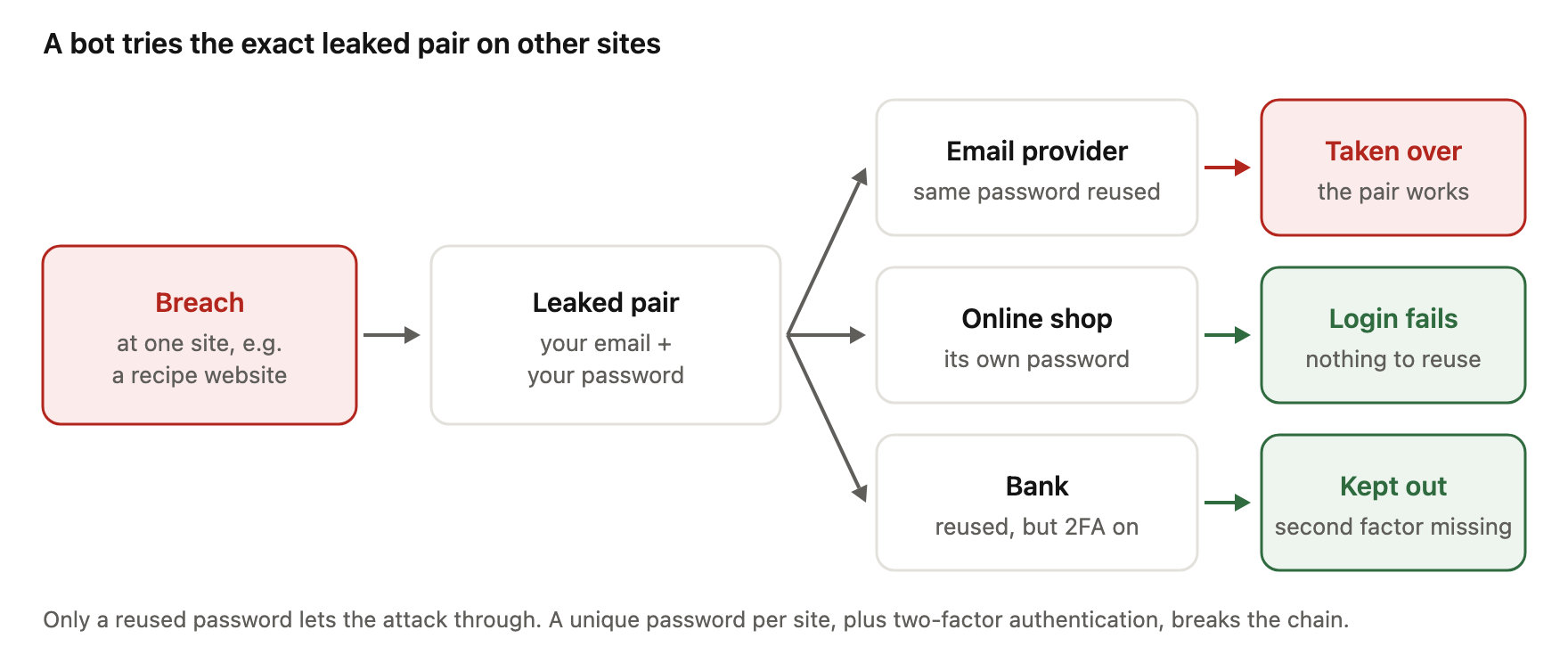
The most direct use of leaked passwords is credential stuffing. OWASP, a non-profit that publishes web security guidance, defines it as "testing username/password pairs obtained from the breach of another site" [7]. Example: your email and password leak from a recipe website. A bot then tries that exact pair on email providers, online shops and banks.
This only works if you reused the password. CISA tells a similar story in its password guidance: someone's account was taken over because a password exposed in a company breach was also used on another account [4]. If every account has its own password, a leaked one opens only the account it came from.
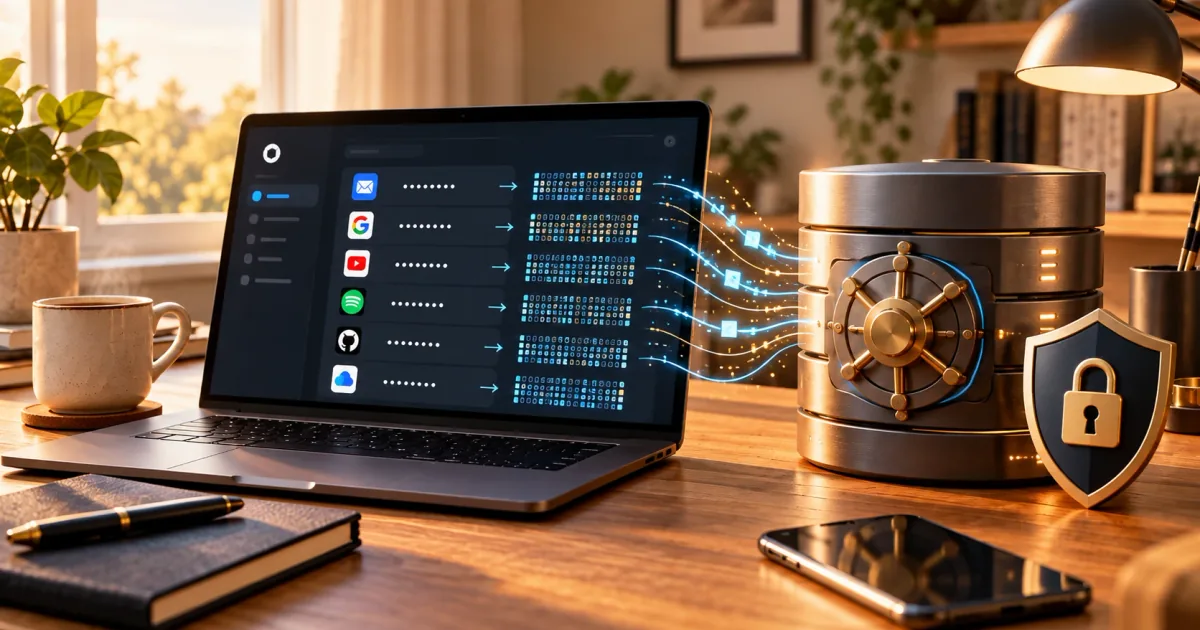
How one breach spreads to other accounts, and what stops it:
Phishing that follows a breach
Leaked contact details make phishing more convincing. An attacker who knows your name, email and which shop you use can write a message that looks like a real order problem. A breach also gives scammers a ready-made story: "Your account was in a breach, click here to secure it."
CISA's signs of phishing include urgent or emotional language, requests for personal or financial information, and slightly wrong addresses such as a misspelled domain [5]. CISA also warns that good spelling is no longer a reliable sign of a real message, because AI tools can write fluent text [5].
How to find out if you are affected
Breach notifications
Often the first sign is an email or letter from the company. The FTC tells businesses that quick notification lets people take steps to reduce the chance their information is misused, and that a notice should clearly describe what is known: how the breach happened, what information was taken and what the company has done [2].
Be careful with the notice itself. Do not click links in an unexpected email about a breach. Instead, open the company's website by typing the address yourself, or use its app, and look for the announcement there.
Breach lookup services
Have I Been Pwned is an independent service that collects data from known breaches so people can check where their email address appears [8]. It says that when breach data is loaded, the passwords are not loaded with the email addresses, and it does not show passwords in search results [8]. It also states that its collection is only a small part of all breached records [8], so a clean result does not prove your data was never exposed. This site has no connection to Have I Been Pwned; we describe it because it is widely used.
The same project runs Pwned Passwords, a separate list of passwords seen in breaches [8]. Its range search uses a method called k-anonymity: you send only the first five characters of the password's SHA-1 hash, and the service returns all matching hash endings, so you can check for a match on your own device without sending the full hash [10]. OWASP recommends that websites check new passwords against breached password datasets like this one [7], and NIST requires services to block passwords from previous breach corpuses [9].
Our password strength checker does something related but different. It runs in your browser and compares your password against built-in dictionaries of common passwords and patterns. It does not look up breach databases.
What to do after a data breach: a checklist
Stay calm and work through the steps that fit the data that leaked. Most take a few minutes each.
Steps for everyone
- Confirm the breach. Check the company's official website or app, not links in an email.
- Find out what was exposed. The steps depend on the data type [3].
- Change the password for that account. The FTC advises changing it right away, especially if the breach involved your password [3]. NIST also requires services to force a change when there is evidence a password was compromised [9].
- Change it everywhere you reused it. The FTC's advice covers accounts where you used "a similar password" too [3], not only the exact same one. Attackers try small variations.
- Use a unique, generated password for each account. Our password generator creates random passwords in your browser. A password manager stores them so you do not have to remember them; Are Password Managers Safe? covers the trade-offs.
- Turn on two-factor authentication. The FTC recommends multi-factor authentication, such as an authentication app or a security key, because it helps protect an account even when the password is exposed [3]. See What Is Two-Factor Authentication? to compare methods.
- Watch for phishing. Expect messages that mention the breach. Check sender addresses and links carefully [5].
- Contact your bank or card issuer if payment details were exposed, and check your statements for charges you do not recognise.
You do not need to change every password on a schedule. NIST says services SHALL NOT require periodic password changes [9]. Change a password when there is a reason: a breach, a suspected compromise, or reuse.
Extra steps for US readers
These steps use US systems. Other countries have their own credit agencies and rules.
- Consider a credit freeze. While a freeze is in place, nobody can open a new credit account in your name. It is free, you place it with each of the three credit bureaus (Equifax, Experian and TransUnion), and it does not affect your credit score [11].
- Or place a fraud alert. A fraud alert asks lenders to verify your identity before opening new credit. It is free, and you contact only one bureau, which must tell the other two [11].
- Check your credit reports for accounts you do not recognise. The FTC points to free credit reports as a way to monitor your credit [12].
- If someone has used your information, report it and get a recovery plan at IdentityTheft.gov, the FTC's identity theft site [3][12].
How organisations should respond
The FTC's guide for businesses describes three stages [2]. First, secure operations: move quickly to stop more data loss, take affected equipment offline, and remove any personal data posted on the company's website by mistake. Second, fix the weaknesses that allowed the breach. Third, notify the right people: law enforcement, affected businesses, and the individuals whose data was exposed [2].
For password data in particular, NIST's rules give a clear direction. Services should force a password change when there is evidence of compromise, and should reject passwords that appear in breach lists when users choose new ones [9]. OWASP adds that services should show users their recent logins and active sessions, so people can spot and end access they do not recognise [7].
How to reduce the impact of the next breach
You cannot stop a company from being breached. You can make each breach small.
Give every account its own long, random password, created with a generator and kept in a password manager. Turn on two-factor authentication for important accounts, starting with email, because email is often used to reset every other password. An authenticator app is a good option where security keys or passkeys are not available; our TOTP generator shows how those six-digit codes are made.
Share less data where you can. An account you no longer use still holds your details, so close it. Optional fields such as birthday or phone number can often be left empty.
Finally, keep your devices and apps updated, and treat unexpected messages about your accounts with care. None of these steps make you immune, but together they mean a breach at one company stays a small, fixable problem.
Frequently asked questions
What is a data breach in simple terms?
It is when personal or sensitive information is accessed, copied or exposed by someone who is not allowed to have it. It includes outside attacks, data left publicly open by mistake, and staff accessing records without a valid reason.
Is a data leak the same as a data breach?
People often use the words for the same thing. "Leak" usually suggests the data was exposed by accident, while "breach" covers any unauthorised access or disclosure. The steps you should take are the same.
My email address was in a breach. Should I worry?
An exposed email address on its own mainly means more spam and more convincing phishing. Check whether a password was also exposed. If it was, change it on that site and anywhere you reused it, and turn on two-factor authentication.
Do I need to change all my passwords after a breach?
No. Change the password for the breached account and for any account where you used the same or a similar password. If every account already has a unique password, the other accounts are not affected by this leak.
Will a credit freeze hurt my credit score?
No. According to the FTC, a credit freeze is free and does not affect your credit score. It applies to the US credit bureaus; other countries have different systems.
Is it safe to type my password into a breach checking website?
Do not type a password into any site that sends it to a server. Pwned Passwords' range search is designed so that only the first five characters of the password's hash are sent, and the comparison happens on your side.
References
- NIST Computer Security Resource Center, Glossary: breach (definitions from CNSSI 4009-2022, NIST SP 800-53 Rev. 5 and OMB M-17-12), accessed 2026-10-07, https://csrc.nist.gov/glossary/term/breach — definition of a breach, including potential access and authorised users acting for unauthorised purposes.
- Federal Trade Commission, Data Breach Response: A Guide for Business, August 2023, https://www.ftc.gov/business-guidance/resources/data-breach-response-guide-business — secure operations, fix vulnerabilities, notify law enforcement, businesses and individuals; what a notice should describe.
- Ari Lazarus (FTC), Have you been affected by a data breach? Read on, consumer alert, 24 October 2022, https://consumer.ftc.gov/consumer-alerts/2022/10/have-you-been-affected-data-breach-read — change passwords right away, including on accounts with similar passwords; turn on MFA; check what was exposed and use IdentityTheft.gov/databreach; example of a password from an unrelated breach used to reach a company database.
- CISA, Use Strong Passwords (Secure Our World), accessed 2026-10-07, https://www.cisa.gov/secure-our-world/use-strong-passwords — long, random, unique passwords; password managers; example of an account taken over through a password reused after a company breach.
- CISA, Recognize and Report Phishing (Secure Our World), accessed 2026-10-07, https://www.cisa.gov/secure-our-world/recognize-and-report-phishing — description of phishing; signs such as urgent language, requests for personal information, wrong addresses; AI-written messages may have perfect grammar.
- CISA, Ransomware 101 (#StopRansomware), accessed 2026-10-07, https://www.cisa.gov/stopransomware/ransomware-101 — definition of ransomware; actors threaten to sell or leak exfiltrated data or authentication information.
- OWASP Cheat Sheet Series, Credential Stuffing Prevention Cheat Sheet, accessed 2026-10-07, https://cheatsheetseries.owasp.org/cheatsheets/Credential_Stuffing_Prevention_Cheat_Sheet.html — definition of credential stuffing; MFA as primary defence; checking passwords against breached password datasets such as Pwned Passwords; showing users login history and sessions.
- Have I Been Pwned, FAQs, accessed 2026-10-07, https://haveibeenpwned.com/FAQs — what the service counts as a breach; aggregates breaches so people can see where their data was exposed; passwords not loaded with email addresses or shown in search; collection is a small subset of all breached records; Pwned Passwords.
- NIST, SP 800-63B Revision 4: Digital Identity Guidelines — Authentication and Authenticator Management, final, August 2025, https://pages.nist.gov/800-63-4/sp800-63b.html — sec. 3.1.1.2: blocklist including passwords from previous breach corpuses; SHALL NOT require periodic changes; SHALL force a change on evidence of compromise; salted and hashed storage.
- Have I Been Pwned, API v3 documentation: Searching Pwned Passwords by range, accessed 2026-10-07, https://haveibeenpwned.com/API/v3 — k-anonymity range search: first five characters of a SHA-1 or NTLM hash sent, suffixes and counts returned, full hash not disclosed.
- Federal Trade Commission, What To Know About Credit Freezes and Fraud Alerts, updated August 2025, https://consumer.ftc.gov/articles/what-know-about-credit-freezes-fraud-alerts — credit freeze free, placed with all three bureaus, no effect on credit score; fraud alert free, contact one bureau which notifies the others.
- Federal Trade Commission, What To Know About Identity Theft, updated September 2024, https://consumer.ftc.gov/articles/what-know-about-identity-theft — free credit reports to monitor credit; IdentityTheft.gov for recovery after a breach or identity theft.