Password managers
Are Password Managers Safe?
How password managers encrypt your vault, what a breach would expose, the real risks, and how to set one up safely with a strong master password and MFA.
The short answer
A password manager is an app that creates, stores and fills in your passwords. It keeps them in an encrypted vault, a single file or database that only opens with your master password, the one password you still have to remember.
No tool removes all risk. But the risks a password manager brings are mostly known and manageable, while the risk it removes, using the same or similar passwords everywhere, is a common way accounts are taken over.
The problem password managers solve
Password reuse and credential stuffing
Most people have dozens of accounts. Remembering a different long password for each one is not realistic, so many people reuse a few passwords with small changes.
Attackers exploit this with credential stuffing. OWASP, a non-profit that publishes web security guidance, defines it as "testing username/password pairs obtained from the breach of another site" [2]. Example: a small forum leaks your email and password. A bot then tries that exact pair on email providers, shops and banks. OWASP notes that the attack works because people reuse passwords across sites and often use one email address for everything [2].
A related attack, password spraying, tries one common password against many accounts [2]. Both depend on passwords that are predictable or already known; see How Passwords Get Cracked.
A password manager removes the need to remember, so every account can have its own long, random password. If one site leaks, the stolen password opens only that one account.
Why standards support password managers
NIST SP 800-63B, the US federal guideline for digital authentication, says that websites "SHALL allow the use of password managers and autofill" and SHOULD allow pasting into password fields so managers still work when autofill is not available [3]. It also notes that password managers have been shown to make people more likely to choose stronger passwords, especially when the manager includes a password generator [3].
OWASP gives website builders similar advice: allow paste into username, password and MFA fields, accept long passwords, and use standard HTML login forms so managers can fill them [1]. In other words, the main security guidelines treat password managers as something to support, not to block.
How vault encryption works
Details differ between products, but reputable managers share the same basic design.
Client-side encryption
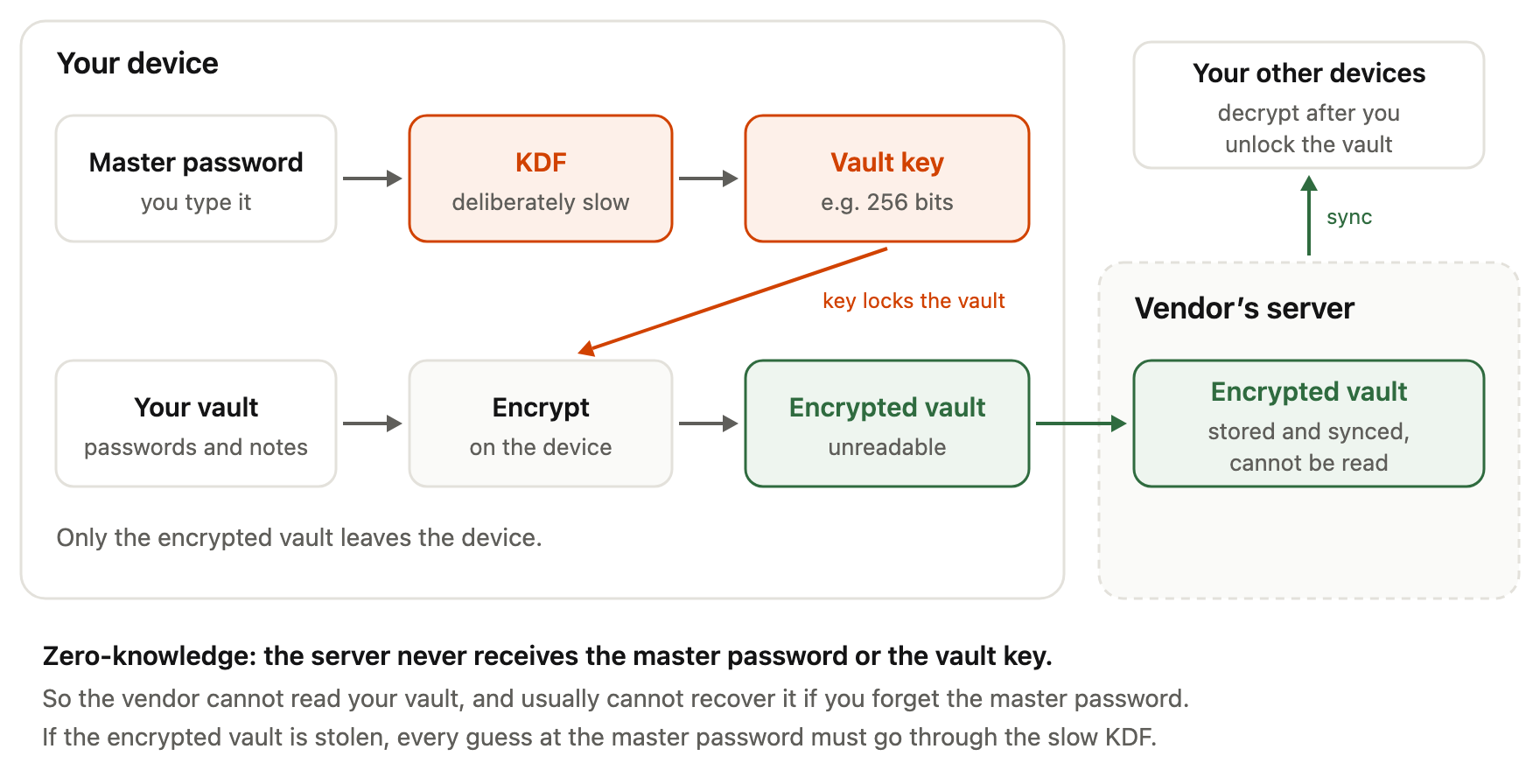
Client-side encryption means your data is encrypted on your own device, before it is sent anywhere. Example: you save a new password in the app on your laptop. The app encrypts it locally, and only the encrypted result is uploaded to the vendor's servers for syncing to your phone.
The server stores and moves data it cannot read. Decryption happens again on your devices when you unlock the vault.
Turning a master password into a key
Encryption needs a key, a long secret value that the cipher uses to lock and unlock data. Your master password is not used as the key directly. Instead, the app runs it through a key derivation function (KDF), a deliberately slow calculation that turns a password into a key. Example: your master passphrase goes in, and a 256-bit key comes out.
The slowness matters. An attacker who steals an encrypted vault must run every guess through the same slow calculation. That does not save a weak master password, but it makes each guess more expensive.
Zero-knowledge architecture
Vendors often call this design zero-knowledge. The term means the company stores your vault but does not have the key to open it, because the key is derived from a master password the company never receives. The practical consequence cuts both ways: the vendor cannot read your data, and the vendor usually cannot recover it if you forget your master password.
Here is the whole flow in one picture:
Two documented examples
Bitwarden's white paper states that it encrypts your data as soon as you enter it in any Bitwarden app. It says the encrypted vault includes the websites you save and even item and folder names, and that it uses AES 256-bit encryption with a key derived from the master password using PBKDF2 SHA-256 [4]. Bitwarden also states that it never stores your master password and cannot recover it if you lose it [4].
Proton describes a layered design for Proton Pass. Each item has its own random key, each vault has a random key, and those keys are protected by a user key. The user key is encrypted using a bcrypt hash of the account password [6]. Proton states that vault and item data use 256-bit AES-GCM, that all cryptographic operations happen on your device, and that usernames, web addresses and notes are encrypted, not just passwords [5][6]. For signing in, Proton says it uses a hardened version of the Secure Remote Password (SRP) protocol, which is designed so that the password itself is not sent to the server [6].
These are the vendors' own descriptions. They tell you what the design is meant to do; independent audits, which Proton says it publishes [5], are how outsiders check it. If you want to compare specific products, see our comparison of popular password managers.
What a vault breach would and would not expose
Imagine an attacker breaks into a password manager company and copies its database. Based on the designs above, here is what they would and would not get. This is our interpretation of the vendors' documentation, not a guarantee for any specific incident.
They would get encrypted vaults. To read one, they would need its key, which means guessing the owner's master password offline, one slow KDF calculation per guess. Proton states that its servers never have access to your unencrypted keys or data [6], and Bitwarden states that it cannot see your passwords or websites [4].
They might also get information that is not encrypted. What that includes depends on the product. Bitwarden's paper points out that some password managers (not Bitwarden, it says) keep website addresses unencrypted [4]. A list of the sites you have accounts on is useful to an attacker even without the passwords, for example to write convincing phishing emails. Account details needed to run the service, such as your email address, are also likely to be stored in a readable form; check each vendor's documentation.
The key point: after a breach like this, your safety depends heavily on the strength of your master password.
The master password is the weak point
Encryption moves the risk from many passwords to one. A strong design cannot protect a vault whose master password is Summer2026!, because an attacker with the encrypted vault can try common passwords first, and that one is on every list.
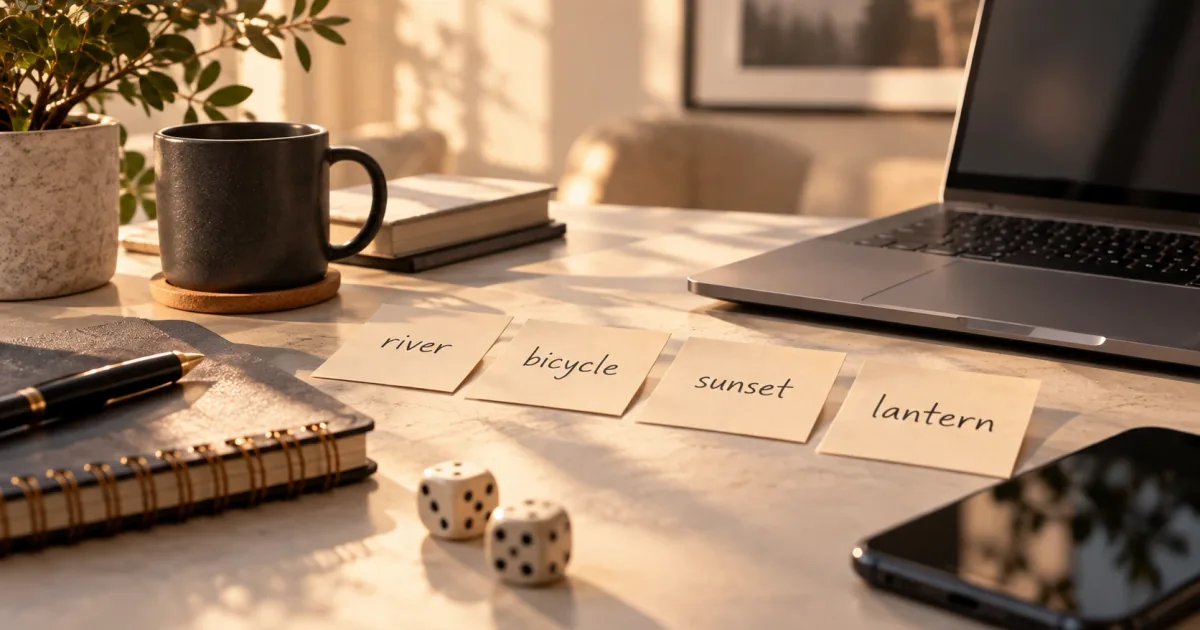
Two rules follow. First, the master password must be long and unpredictable. A passphrase of several random words is a good fit: easy to type and remember, hard to guess. You can create one with our passphrase generator, and What Is a Passphrase? explains why random words work. Check how a candidate scores with the password strength checker, which runs in your browser.
Second, the master password must be unique. If you have ever used it anywhere else, a leak from that site could hand an attacker the key to everything.
Then think about recovery: what happens if you forget it. Because of the zero-knowledge design, the vendor often cannot reset it for you [4]. Some products offer recovery options, such as an emergency contact or a recovery kit. Set these up on day one, and store any printed recovery details somewhere physically safe, not in the vault itself.
Why MFA on the manager account matters
Multi-factor authentication (MFA) asks for a second proof, such as a code from an authenticator app or a hardware security key, in addition to your password. OWASP calls MFA "by far the best defense against the majority of password-related attacks" [1][2].
For a password manager, MFA protects the account that controls your encrypted vault. If someone learns your master password, for example through a fake login page, they still need the second factor to sign in and download your vault from the server. It does not fix a weak master password against an attacker who already has a stolen copy of the vault, so it works alongside a strong master password, not instead of one.
Prefer a phishing-resistant method, such as a security key or passkey, where available. What Is Two-Factor Authentication? compares the options.
Autofill and phishing
Autofill means the manager fills in your username and password on a login page for you. Many managers only offer a saved login on the web address it was saved for. If that is how your manager works, it will not suggest your bank password on a look-alike domain such as examp1e-bank.com, and that hesitation is a useful warning sign.
Treat this as a helpful side effect, not a promise: it varies by product, and you can still paste a password into a fake page by hand. If autofill does not offer a login where you expected one, check the address before typing anything.
Browser vs standalone password managers
Most web browsers include a built-in password manager. Standalone managers are separate apps, usually with browser extensions and mobile apps.
In general, a browser manager is convenient, already installed and much better than reusing passwords. A standalone manager usually works across different browsers and operating systems and offers more control over sharing, recovery and vault settings. What is encrypted and how the key is derived differ between products, so check the documentation of the one you use.
Honest risks and trade-offs
A single point of failure
Putting all passwords in one place means one master password, one account and one set of devices guard everything. That is the real trade-off. It is acceptable because the alternative is usually not "many strong, separate secrets" but "a few weak, reused ones". It still means the master password, MFA and recovery setup deserve real care.
Malware on your device
Client-side encryption protects data while it is stored and transferred. When you unlock the vault, the passwords are decrypted on your device so you can use them. Our interpretation, not taken from a cited source: if your device is controlled by malware, such as a keylogger, it may be able to capture the master password or read data while the vault is open. No password manager can fully protect a compromised device. Keep your system and apps updated, and lock the vault when you are not using it.
Trusting the vendor
You are trusting the vendor's code and its honesty about how that code works. Published security documentation, independent audits and public source code help outsiders check those claims; Proton, for example, says its apps are open source and audited [5]. These reduce the trust you need but do not remove it.
A practical setup checklist
- Choose a reputable manager with published security documentation.
- Create a long, unique master passphrase with the passphrase generator. Do not use it anywhere else.
- Turn on MFA for the manager account, ideally with a security key or passkey.
- Set up recovery options and store any recovery details offline, in a safe place.
- Replace reused passwords, starting with email, banking and other important accounts. Use the manager's generator or our password generator.
- Keep your devices and the manager app updated.
- Set the vault to lock automatically after a period of inactivity.
- Watch the web address when you log in, especially if autofill does not offer a saved login.
Conclusion
Password managers are not risk-free: they concentrate your secrets behind one master password and cannot protect a compromised device. But they make unique, random passwords practical for every account. For most people, a reputable password manager with a strong, unique master password and MFA turned on is a safer choice than remembering and reusing passwords. That is a reasoned judgement about likely risks, not a guarantee.
Frequently asked questions
Can the password manager company see my passwords?
In a zero-knowledge design, no. Your vault is encrypted on your device with a key derived from your master password, which the company does not receive. Bitwarden and Proton both state this in their documentation. You are still trusting that the software works as described.
What happens if my password manager is breached?
Attackers would get encrypted vaults and possibly some unencrypted account information. To read a vault, they would have to guess its master password offline. A long, random, unique master password makes that very hard. Change any password the vendor tells you to, and watch for phishing emails.
What if I forget my master password?
With many managers, the company cannot reset it, because it never knew it. Set up the recovery options your manager offers, such as an emergency contact or recovery kit, as soon as you create the account.
Is a browser's built-in password manager safe enough?
For many people it is a big improvement over reusing passwords. Standalone managers usually work across more browsers and devices and offer more options. Check what your browser encrypts and protect the account it syncs to with MFA.
Should I store my 2FA codes in the same password manager?
It is a trade-off. Keeping both in one place is convenient, but if the vault is opened, both factors are exposed together. For your most important accounts, consider keeping the second factor separate, for example on a security key.
Does a password manager protect me from phishing?
Partly. Many managers only offer a saved login on the address it was saved for, which can warn you about a fake site. This depends on the product, and you can still paste a password into a fake page manually, so check the address yourself.
References
- OWASP Cheat Sheet Series, Authentication Cheat Sheet, accessed 2026-10-06, https://cheatsheetseries.owasp.org/cheatsheets/Authentication_Cheat_Sheet.html — website advice to allow paste, long passwords and standard login forms for password managers; MFA as the best defence against most password-related attacks.
- OWASP Cheat Sheet Series, Credential Stuffing Prevention Cheat Sheet, accessed 2026-10-06, https://cheatsheetseries.owasp.org/cheatsheets/Credential_Stuffing_Prevention_Cheat_Sheet.html — definitions of credential stuffing and password spraying; reuse of passwords and email addresses across sites; MFA as primary defence.
- NIST, SP 800-63B Revision 4: Digital Identity Guidelines — Authentication and Authenticator Management, final, August 2025, https://pages.nist.gov/800-63-4/sp800-63b.html — sec. 3.1.1.2: verifiers SHALL allow password managers and autofill, SHOULD permit paste; password managers shown to increase the likelihood of stronger passwords, especially with generators.
- Bitwarden, How End-to-End Encryption Paves the Way for Zero Knowledge (white paper), undated, accessed 2026-10-06, https://bitwarden.com/resources/zero-knowledge-encryption-white-paper/ — encryption in the client as soon as data is entered; websites and item/folder names encrypted; AES 256-bit; PBKDF2 SHA-256 key derivation; master password not stored and not recoverable; some other managers keep URLs unencrypted.
- Proton, Proton Pass security, accessed 2026-10-06, https://proton.me/pass/security — 256-bit AES-GCM vault encryption; usernames, web addresses and notes encrypted; open-source apps; published third-party audits.
- Adrià Casajús (Proton), Proton Pass security model, 20 April 2023, https://proton.me/blog/proton-pass-security-model — item, vault and user key hierarchy; user key encrypted with a bcrypt hash of the account password; AES-GCM; all cryptographic operations on the device; hardened SRP login; servers never access unencrypted keys or data.