Secure randomness
Why Our Password Generator Works Offline
Our password generator runs in your browser and keeps working offline. What that proves, what it does not, and how to check it yourself in two minutes.
What "works offline" means here
Once a page of this site has loaded, its generator keeps working with no internet connection. You can switch off Wi-Fi, keep pressing regenerate, change the length and download a bulk file.
That is not a separate "offline mode". It is a side effect of how the generator is built: every step happens inside your browser tab, so nothing needs a server after the files have arrived. The offline test is useful because it is a check you can run without any technical knowledge. If the generator needed a server to make passwords, it would stop working.
Two tools need one extra file first, and both fetch it from our own domain. The passphrase generator downloads its wordlist (the EFF large list, 7,776 words) when the page opens. The password strength checker downloads its dictionaries, about 411 KB, the first time you click into its field. After that, both work offline too.
What happens when you click Generate
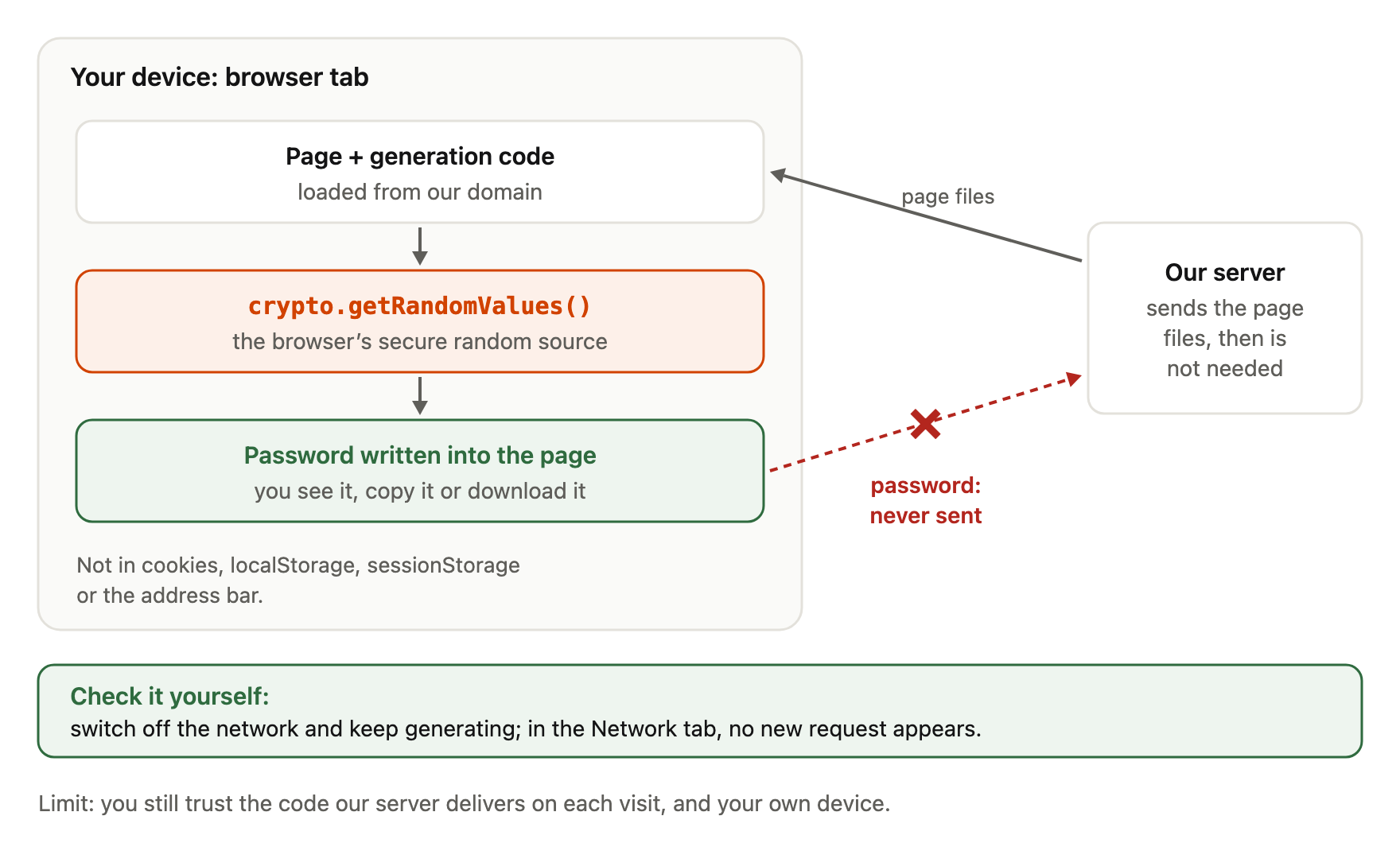
Your browser has a built-in source of cryptographically strong random numbers, available to every page as crypto.getRandomValues() [1]. Our generator asks it for random 32-bit numbers and turns each one into a character. Numbers that would make some characters slightly more likely than others are discarded and redrawn (rejection sampling), so every character is equally likely. CSPRNG vs Math.random() explains this in detail.
If crypto.getRandomValues() is missing, the generator stops with an error. It never falls back to Math.random(), which MDN says must not be used for anything related to security [2].
The finished password is written into the page. If the production implementation matches the documented architecture, that is the end of its journey: no request carries it anywhere.
In one picture, the password is made and used inside your browser tab:
Where the password does not go
Our site does not send the password to our server, and the site does not store it. It is not written to cookies, localStorage or sessionStorage, it is not put into the address bar, and our automated tests check all of these after generating and copying.
Your settings, such as the length, are kept in the part of the address after #, called the fragment (for example #len=20). Browsers do not send the fragment to the server when they request a page [3]. The password itself is never placed in the address.
"Not stored by the site" has a precise scope. Things outside the page are outside our control. Your operating system's clipboard history or a clipboard manager may keep a copy of anything you copy. Your browser's autofill and your password manager store what you save in them, which is usually what you want. Our clipboard auto-clear (described on How It Works) reduces how long a copied password sits in the clipboard; it cannot remove copies other software has already made.
What about server logs? Our own static file server does not write per-request logs. Like almost any website, though, the hosting provider and the network may keep standard access logs: which file was requested, when, from which IP address and with which browser user agent. Those logs show that someone opened the page. They cannot contain the password, because the password is never sent.
Check it yourself in two minutes
You do not have to take our word for any of this.
The Network tab. Open your browser's developer tools (F12, or Cmd+Option+I on a Mac) and choose the Network tab. Reload the page. You will see the page's own files load from our domain. Now generate, copy and download as much as you like. No new request should appear. On the passphrase generator you will see the wordlist load first; on the strength checker, the dictionaries load when you first click into the field. Those are files coming to you, not data going out.
The offline test. Load the password generator, then disconnect from the internet. Keep generating. If anything depended on a server, it would fail now.
Together, these two checks are stronger than either alone. The Network tab shows what the page does while you watch; the offline test shows that it does not need the network at all.
What the Content Security Policy proves, and what it does not
Every page is served with a Content Security Policy (CSP), a header that tells the browser which sources a page may use. Ours includes script-src 'self' (only scripts from our domain, plus a few small inline scripts identified by their hash) and connect-src 'self'.
connect-src controls where scripts can send data with interfaces such as fetch(), XMLHttpRequest, WebSocket, EventSource and navigator.sendBeacon() [4]. With 'self', those requests can only go to our own domain. That means a script on the page could not quietly send your password to a third-party server through those interfaces.
What the CSP does not prove is that nothing is sent to our own domain. A policy that allows 'self' would allow a request to us. That is exactly why the Network tab test matters: it shows that no request is made at all while you generate.
The limits of client-side trust
Client-side generation removes the server from the moment the password is created. It does not remove the need to trust the code.
The code is delivered by our server every time you load the page. If our server, our hosting account or our build process were compromised, a different script could be delivered, and it could behave differently. The CSP would not stop that, because that script would come from our own domain. Each of the checks above tests the code you received on that visit, not the code you will receive next time.
Your own device matters too. Malware or a browser extension with permission to read and change pages can read any page, including this one. Client-side generation cannot make an unsafe device safe.
Published source helps only if the code your browser runs matches it. The page runs a minified bundle: the same logic, compressed into a form that is hard for people to read. Comparing the two is possible for an expert but not trivial. We do not currently offer reproducible builds (a way for anyone to rebuild the bundle and get an identical file) or Subresource Integrity, a browser feature that checks a fetched file against a known hash [5]. Note that SRI on its own is designed for files from third-party hosts such as CDNs [5]; the hashes would be delivered by the same server as the scripts, so it would not by itself answer the "compromised server" question. That last point is our interpretation, not a statement from the specification.
Why we publish the generation code
With these limits in mind, publishing the code still has real value. The readable source of the generation module, a few short files, is published with every build under /source/crypto/, starting with random.ts, the file every tool takes its randomness from. An automated test checks that the published files are identical to the files in our repository before release.
This lets anyone with some JavaScript knowledge confirm the design: that randomness comes only from crypto.getRandomValues(), that there is no fallback, and that characters are chosen uniformly. It also makes our claims specific enough to be wrong, which is the point. A vague promise cannot be checked; a published function can.
There is no public repository or licence yet, so we call this "published source", not open source. For the step-by-step verification guide and the full CSP, see How It Works.
Frequently asked questions
Does the password generator work without internet?
Yes, once the page has loaded. The passphrase generator and the strength checker first load a wordlist or dictionaries from our domain; after that they work offline too.
Is my password sent to your server?
No request carries the password; you can confirm this in the Network tab. The hosting provider may log that the page was requested, but never what you generated.
Do you store generated passwords?
The site does not store them in cookies, browser storage or the URL. Your clipboard history, browser autofill or password manager may store a copy if you use them.
If it works offline, can I trust it completely?
Offline operation shows the page does not need a server to generate passwords. It does not prove the delivered code is the same as the published source, and it cannot protect against malware or malicious extensions on your device.
Can I save the page and use it fully offline forever?
We do not currently offer an installable offline version. Loading the page and then disconnecting is the supported way to use it offline.
References
- MDN Web Docs, "Crypto: getRandomValues() method", accessed 2026-10-06, https://developer.mozilla.org/en-US/docs/Web/API/Crypto/getRandomValues — cryptographically strong random values; available in Web Workers.
- MDN Web Docs, "Math.random()", accessed 2026-10-06, https://developer.mozilla.org/en-US/docs/Web/JavaScript/Reference/Global_Objects/Math/random — not cryptographically secure; do not use for anything related to security.
- MDN Web Docs, "URI fragment", accessed 2026-10-06, https://developer.mozilla.org/en-US/docs/Web/URI/Reference/Fragment — "The fragment is not sent to the server when the URI is requested".
- MDN Web Docs, "CSP: connect-src", accessed 2026-10-06, https://developer.mozilla.org/en-US/docs/Web/HTTP/Reference/Headers/Content-Security-Policy/connect-src — interfaces restricted by connect-src (fetch, XMLHttpRequest, WebSocket, EventSource, sendBeacon,
<a ping>). - MDN Web Docs, "Subresource Integrity", accessed 2026-10-06, https://developer.mozilla.org/en-US/docs/Web/Security/Subresource_Integrity — definition; designed against tampering by third-party hosts such as CDNs.