Attacks and password strength
What Is a Brute-Force Attack?
A brute-force attack tries every possible password. Learn how search space, online limits, lockouts, MFA and slow hashes decide whether it can succeed.
A brute-force attack is an attempt to find a secret by trying every possible candidate in a defined set until one works. Example: to open a 4-digit PIN lock, try 0000, then 0001, then 0002, all the way to 9999. One of those 10,000 values must be correct.
The attack needs no information about the victim. It does not use dictionaries, names or leaked passwords. It relies only on the fact that the set of possibilities is finite. That makes it guaranteed to succeed eventually, and it also makes it slow, because it gives no priority to likely passwords.
Many sources use "brute force" more loosely, to include guessing from word lists. OWASP, for example, defines it as "testing multiple passwords from dictionary or other source against a single account" [2]. In this guide, brute force means the strict, exhaustive meaning. Dictionary attacks, credential stuffing and password spraying are different methods; they are explained in How Passwords Get Cracked.
Search space: how many candidates there are
The search space is the full set of candidates the attacker has to cover. For a password of length L built from a character set of size N, it contains N^L candidates.
Example: 8 lowercase letters give 26^8, about 2.1 × 10^11 (209 billion) candidates. Twelve lowercase letters give 26^12, about 9.5 × 10^16.
The attacker does not usually need to try them all. If the password was chosen at random, it is equally likely to be anywhere in the list, so on average it is found after trying half the search space. This "half on average" rule is the basis of every crack-time estimate on this site.
Search space is closely related to entropy: log2(N^L) is the entropy in bits. The Password Entropy Explained guide covers that idea, and why it only describes randomly generated passwords.
Online brute force
In an online brute-force attack, every guess is sent to the real service: a login form, an API, or a device's PIN prompt. The service sees each attempt and can respond.
Rate limiting
Rate limiting (also called throttling) restricts how many attempts can be made in a given time. NIST SP 800-63B requires verifiers to limit consecutive failed authentication attempts on a single account to no more than 100 [1]. It also lists techniques that reduce the need to lock accounts, such as bot-detection challenges, waiting periods that grow after each failure, and risk-based checks on IP address, location, timing and browser metadata [1].
The effect on brute force is decisive. With 100 attempts allowed, an attacker can cover 1% of a 4-digit PIN space (100 of 10,000). For an 8-character lowercase password, 100 attempts are a negligible fraction of 209 billion. Exhaustive search through a login form only works against very small search spaces, and only when the service does not limit attempts.
Account lockouts and their downside
An account lockout blocks further login attempts for a period after a set number of failures. OWASP describes it as "the most common protection" against these attacks [3].
Lockout has a cost. If anyone can lock an account by entering wrong passwords, an attacker can lock out real users on purpose. OWASP warns that care must be taken "to prevent it from being used to cause a denial of service by locking out other users' accounts" [3]. That is why lockout thresholds and durations are design choices, and why NIST pairs its 100-attempt limit with softer techniques like increasing delays and bot checks [1][3].
Multi-factor authentication
Multi-factor authentication (MFA) requires something in addition to the password, such as a code from an authenticator app or a hardware security key. Even if a brute-force attack found the password, the attacker would still need the second factor. CISA states that when one factor like the password is compromised, the attacker "will be unable to meet the second authentication requirement" [4]. OWASP names MFA as the best defence against most password-related attacks, including brute force [3].
Offline brute force
In an offline attack, the attacker already has a copy of stored password hashes, usually from a breach. A hash is a one-way fingerprint of the password; the service stores it instead of the password itself. The attacker hashes each candidate on their own hardware and compares the result with the stolen hash [5].
There is no login form, so there is no rate limit and no lockout. The limits are hardware, time and, most importantly, the cost of the hash function.
That cost depends on how the service stored the password. OWASP states that fast hashes such as SHA-256 "are not suitable for password storage because they allow attackers to perform large numbers of guesses quickly" [5]. Password hashing schemes such as Argon2id, scrypt and bcrypt are deliberately slow and have a work factor that makes each guess more expensive [5]. NIST requires stored passwords to be salted and hashed with such a scheme so that they are "resistant to offline attacks" [1]. See How Passwords Should Be Stored for the details.
A worked example shows how much this matters. The figures are the site's assumptions, not measurements. Take a random 8-character lowercase password, with about 1.04 × 10^11 guesses needed on average:
- Fast hash on a GPU rig, assumed 10^11 guesses per second: about 1 second.
- Slow hash such as bcrypt, assumed 10^4 guesses per second: about 121 days.
- Online with rate limiting, assumed 100 guesses per second and no lockout: about 33 years.
The password is the same in all three lines. Only the attacker's situation changed.
What limits an attacker
Every brute-force attack is bounded by four things.
Time. Guessing is only worth doing if the result arrives while it is still useful.
Hardware. More or faster processors (especially GPUs) mean more guesses per second offline. This scales with money, so estimates should assume attackers improve over time.
Hash cost. A slow, salted password hash reduces offline guessing speed for every attacker at once. It is the defender's main lever after a breach.
Rate limits and lockouts. These apply only online, and they cap the number of attempts per account regardless of the attacker's hardware.
Why password length is your lever
As a user, you cannot choose how a website stores your password. You can choose the size of the search space.
The chart below shows how fast N^L grows with length, for lowercase letters and for all 94 printable characters:
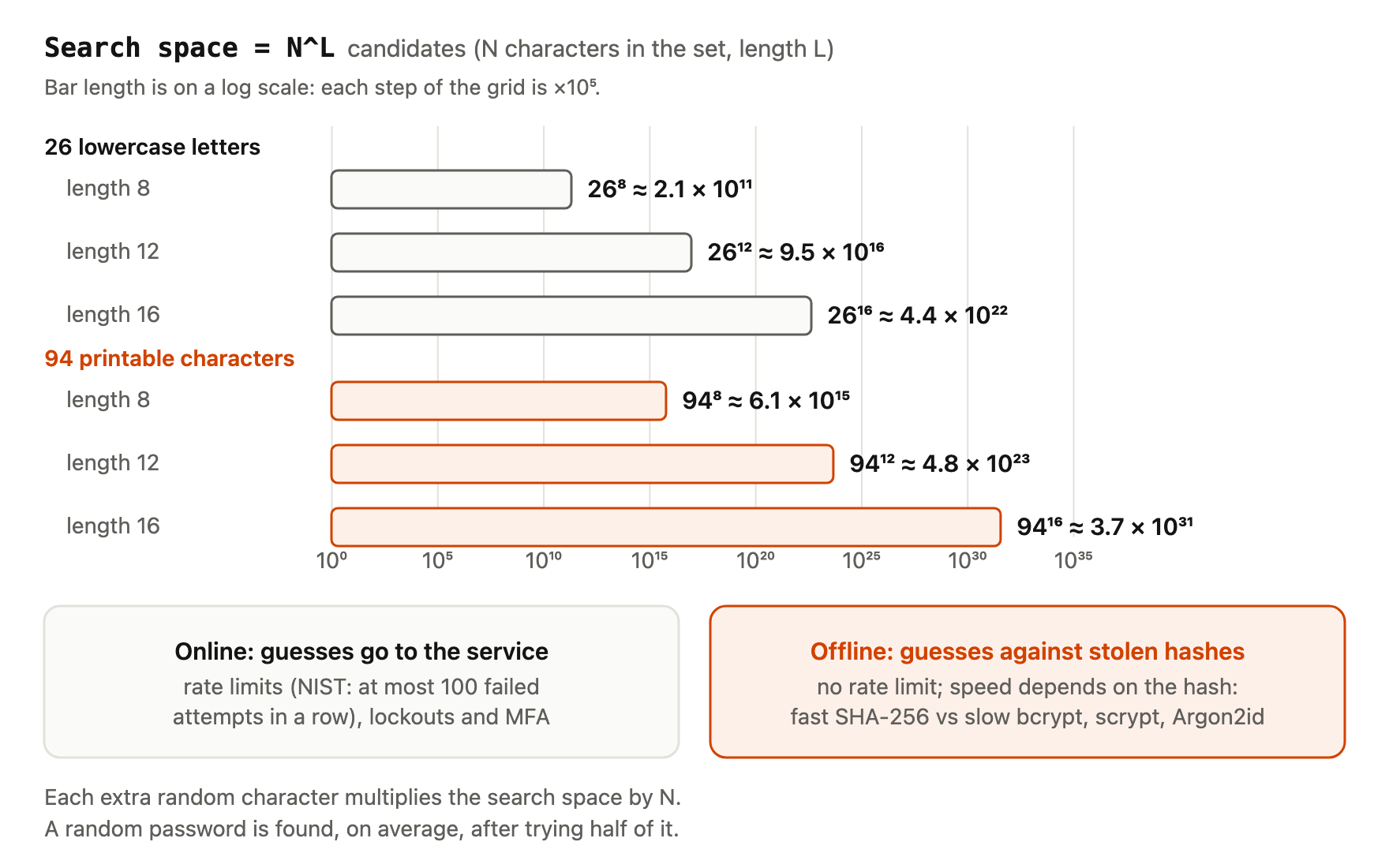
Each extra random character multiplies the search space by N. Moving from 8 to 12 random lowercase letters multiplies it by 26^4, about 457,000. In the fast-hash scenario above, the average estimate goes from about 1 second to about 5.5 days. A random 16-character password from all 94 printable characters has a search space of 94^16; even at an assumed 10^12 guesses per second, the average estimate is on the order of 10^11 years.
Two caveats apply. First, this only holds for randomly generated passwords. A long password made of a common phrase is attacked with lists, not by exhaustive search, and is found much sooner. Second, length does not help against credential stuffing: if a long password is reused and leaks from another site, its length is irrelevant.
To see how length and character set change the search space and estimated crack times, try the Password Entropy Calculator. To create a long random password, use the password generator.
Frequently asked questions
Is a brute-force attack illegal?
Running one against a system you do not own or have permission to test is illegal in many countries. Security teams run authorised brute-force tests against their own systems to check their defences.
Can brute force crack any password?
In theory, yes, given unlimited time. In practice, a long random password has a search space so large that the estimated average time is far beyond any useful period, even under generous assumptions about attacker speed.
Does a 4-digit PIN stand up to brute force?
Only with strict attempt limits. There are just 10,000 combinations. Phones and bank cards rely on lockouts and delays, not on the size of the space. For PINs that you control, longer is better; see the random PIN generator.
Does changing my password regularly protect against brute force?
Not meaningfully. NIST SP 800-63B says services must not require periodic password changes, but must force a change when there is evidence of compromise [1]. A long random password and MFA do more.
Is a dictionary attack the same as brute force?
Not in the strict sense. A dictionary attack tries likely passwords first, while brute force tries every combination. Many sources use "brute force" for both.
References
- NIST, SP 800-63B Revision 4: Digital Identity Guidelines — Authentication and Authenticator Management, final, August 2025, https://pages.nist.gov/800-63-4/sp800-63b.html — 100 consecutive failed attempts limit and alternative techniques (sec. 3.2.2); salting/hashing "resistant to offline attacks" (sec. 3.1.1.2); no forced periodic changes.
- OWASP Cheat Sheet Series, Credential Stuffing Prevention Cheat Sheet, accessed 2026-10-06, https://cheatsheetseries.owasp.org/cheatsheets/Credential_Stuffing_Prevention_Cheat_Sheet.html — OWASP's broad definition of brute force.
- OWASP Cheat Sheet Series, Authentication Cheat Sheet, accessed 2026-10-06, https://cheatsheetseries.owasp.org/cheatsheets/Authentication_Cheat_Sheet.html — account lockout as the most common protection; lockout denial-of-service risk; lockout threshold and duration; MFA as best defence.
- CISA, More than a Password (MFA), accessed 2026-10-06, https://www.cisa.gov/MFA — compromise of one factor does not let the attacker meet the second requirement.
- OWASP Cheat Sheet Series, Password Storage Cheat Sheet, accessed 2026-10-06, https://cheatsheetseries.owasp.org/cheatsheets/Password_Storage_Cheat_Sheet.html — offline cracking process; fast hashes unsuitable; work factor.