Hashing and password storage
How Passwords Should Be Stored
A developer guide to password storage: Argon2id, scrypt, bcrypt and PBKDF2 parameters, salts, peppers, NIST SP 800-63B rules, migrations and safe resets.

Start from the breach
Design password storage for the day the database is copied, whether through SQL injection, a leaked backup or a stolen admin credential. Good storage does not prevent the breach; it decides what the attacker can do next.
The attacker usually gets every row of the users table. With a modern password hashing scheme, the password column holds the algorithm name, its parameters, a salt and a digest for each user. That is expected: the design must stay safe when the attacker knows everything except the passwords (and, if you use one, the pepper).
What they do next is offline guessing. OWASP describes it: the attacker picks candidate passwords, hashes them, and compares the results with the stolen hashes, using lists from earlier breaches, dictionaries or brute force [1]. "Offline" means your login rate limits, lockouts and alerts no longer apply. The only thing slowing them down is the cost of each hash you chose. How Passwords Get Cracked covers the attack techniques; this guide covers the defence.
Two things never to do
Never store plaintext. If passwords are stored as typed, a breach exposes them immediately. Because people reuse passwords, it also exposes their accounts on other sites.
Do not encrypt passwords either. Encryption is reversible with a key (see Hashing vs Encryption). The application needs that key to work, so it usually lives on the same servers an attacker may reach. OWASP says passwords should be hashed with modern adaptive algorithms "rather than encrypted or stored in plaintext" [1]. It allows encryption only "in edge cases where it is necessary to obtain the original plaintext password", for example when an application must log in to another system that offers no modern alternative such as OpenID Connect [1]. For your own users' login passwords, that edge case does not apply.
Why SHA-256 alone is not enough
SHA-256 is a sound cryptographic hash. It is one-way and collision-resistant. But it is built to be fast, and fast is what an attacker wants. OWASP: "Fast hashing algorithms such as SHA-256 are not suitable for password storage because they allow attackers to perform large numbers of guesses quickly" [1].
A worked estimate shows the scale. Take a truly random 8-character password drawn from the 94 printable ASCII symbols: 94⁸ ≈ 6.1 × 10¹⁵ possibilities. On average the attacker searches half of them. Using this site's standard assumptions (not measurements):
| Stored as | Assumed guess rate | Estimated average time |
|---|---|---|
| Fast hash (e.g. SHA-256), GPU rig | 10¹¹ guesses/s | about 8.5 hours |
| Slow password hash (bcrypt-class) | 10⁴ guesses/s | about 9,700 years |
The password is the same in both rows; only the storage changed. One caution: human-chosen passwords are not random, so dictionary attacks find them far sooner, and slow hashing does not save a password that is on a common-password list. Try other lengths in the entropy calculator.
Adding a salt to SHA-256 does not fix the speed problem. It stops precomputed tables and makes each user's hash unique, but each guess is still cheap.
The building blocks: salt, work factor, pepper
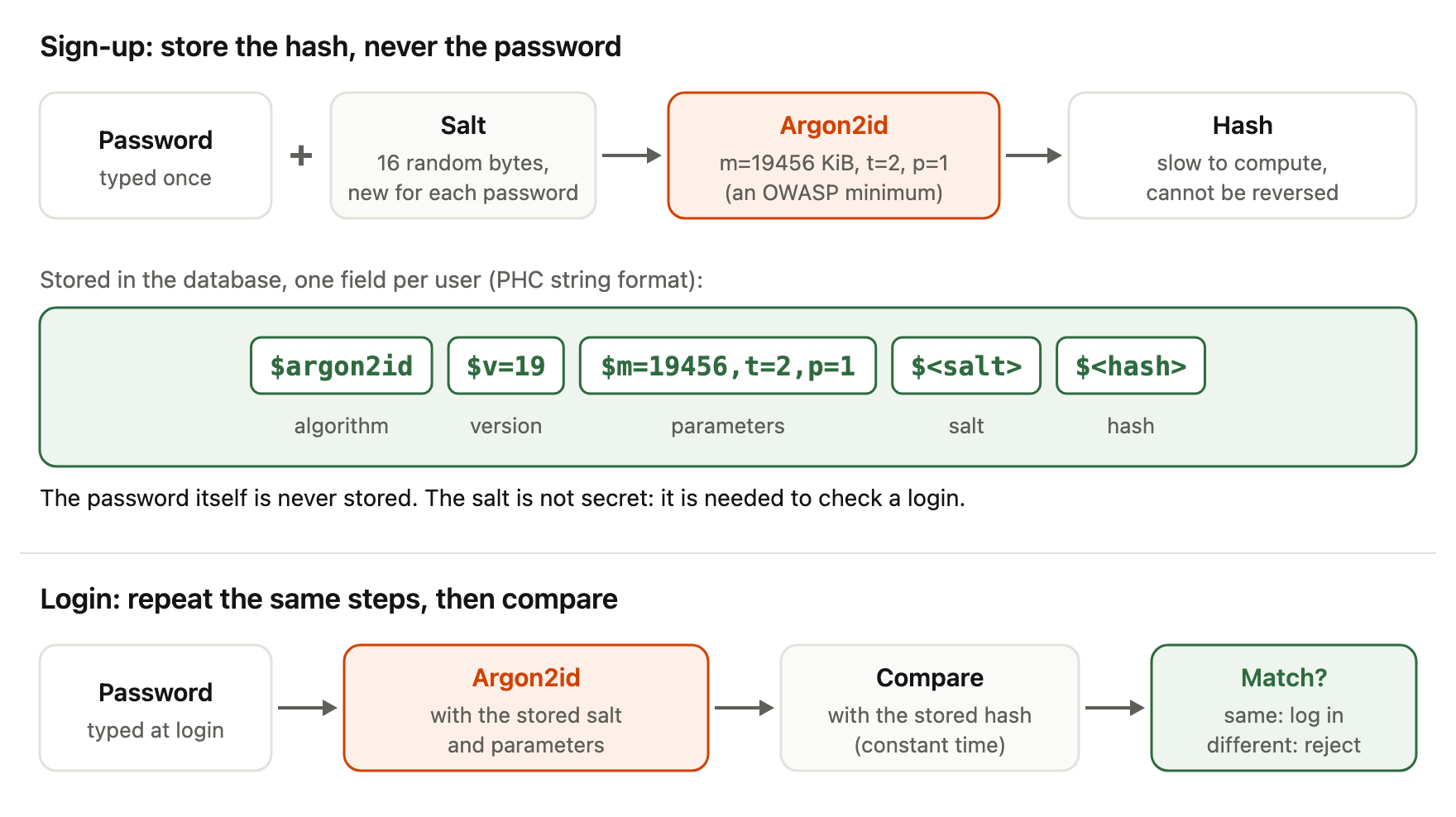
A salt is a unique random value generated for each password and stored with the hash. It ensures that two users with the same password get different stored values and forces the attacker to attack each hash separately [1]. Modern libraries generate and store salts for you; OWASP notes developers "typically do not need to handle salt generation manually" when using them correctly [1]. Details and common misconceptions are in What Is a Cryptographic Salt?.
A work factor (or cost) is a parameter that controls how much computation — and, for memory-hard functions, how much memory — each hash requires. OWASP notes its key advantage: it "can be increased over time as hardware becomes more powerful and cheaper" [1].
A pepper is a secret shared by all passwords and kept out of the database. OWASP says the pepper "should not be stored along with the generated hash" and should live in a secrets vault or a hardware security module (HSM) [1]. One strategy OWASP describes is to hash the password as usual, then apply an HMAC (a keyed hash such as HMAC-SHA256) with the pepper as the key [1]. If only the database leaks, the attacker cannot test guesses without the pepper. The cost is operational: if the pepper is compromised it must be changed, and OWASP warns that "peppers cannot be changed without knowledge of a user's password" [1]. In practice that means storing a pepper version with each hash and re-peppering at each user's next login, or forcing resets. (This is our interpretation of OWASP's warning.)
Choosing an algorithm
OWASP ranks four options [1]. Use the first one your platform supports well.
Argon2id (preferred)
Argon2 is a memory-hard function standardised in RFC 9106 [2]. Memory-hard means each hash needs a large block of memory, so attackers cannot cheaply run millions of guesses in parallel on GPUs or custom chips. Argon2id runs as Argon2i for the first half of the first pass over memory and as Argon2d for the rest [2]; OWASP describes the result as "a balanced approach to resisting both side-channel and GPU-based attacks" [1]. Its parameters are memory m (in KiB), iterations t and parallelism p.
OWASP lists these minimum configurations. In its words they "provide an equal level of defense, and the only difference is a trade off between CPU and RAM usage" [1]:
| Memory (m) | Iterations (t) | Parallelism (p) |
|---|---|---|
| 47104 KiB (46 MiB) | 1 | 1 |
| 19456 KiB (19 MiB) | 2 | 1 |
| 12288 KiB (12 MiB) | 3 | 1 |
| 9216 KiB (9 MiB) | 4 | 1 |
| 7168 KiB (7 MiB) | 5 | 1 |
These are floors, not targets. RFC 9106 itself recommends much larger settings where hardware allows: t=1, p=4 with 2 GiB of memory first, or t=3, p=4 with 64 MiB as a second choice, both with a 128-bit salt [2].
scrypt
scrypt is also memory-hard. OWASP's minimum is N=2¹⁷ (128 MiB), r=8, p=1, with equivalent options such as N=2¹⁶, r=8, p=2 [1]. Use it when Argon2id is not available.
bcrypt
bcrypt is widely supported and suitable for legacy systems. OWASP asks for a work factor "as large as verification server performance will allow, with a minimum of 10" [1]. Its main trap is length: most implementations use only the first 72 bytes of input, so OWASP says to enforce a maximum password length of 72 bytes [1]. Note that bytes are not characters: many non-Latin characters take two to four bytes in UTF-8. NIST also requires verifiers to check the entire password rather than truncating it [3], so a silent cut at 72 bytes is not acceptable.
Some systems pre-hash the password with a fast hash (for example SHA-256) and feed the result to bcrypt to avoid the limit. OWASP calls this "dangerous" for two reasons [1]. First, bcrypt expects a null-terminated string, so a raw digest is only used up to its first zero byte; a digest that starts with a zero byte behaves like an empty password. Second, password shucking: if the same fast hash of a user's password has leaked from another site, the attacker can test that leaked value directly against your bcrypt hash, which reduces the work to cracking the fast hash. OWASP's mitigation is to Base64-encode the pre-hash and make it keyed with a pepper, in the form bcrypt(base64(hmac-sha384(password, pepper)), salt, cost) [1]. A simpler path is to choose Argon2id.
PBKDF2
PBKDF2 is defined in NIST SP 800-132 [4] and is the choice when FIPS-140 validated cryptography is required. It is not memory-hard, so it needs many iterations. OWASP's figures are 600,000 iterations for PBKDF2-HMAC-SHA256, 220,000 for PBKDF2-HMAC-SHA512, and 1,400,000 for PBKDF2-HMAC-SHA1, which is for legacy systems only [1].
Tuning the work factor
Start from the minimums above, then measure on your production hardware. OWASP says determining the optimal work factor "will require experimentation" and that "calculating a hash should take less than one second" [1]. NIST uses similar language: the cost factor SHOULD be "as high as practical without negatively impacting verifier performance" [3].
Also plan for load: concurrent logins multiply the memory a memory-hard setting uses, so rate-limit the login endpoint.
Store the parameters with every hash. When you raise the cost later, existing hashes stay valid, and OWASP's common approach is to re-hash with the new setting the next time each user logs in successfully [1].
Put together, sign-up and login look like this:
What NIST SP 800-63B Rev 4 requires
For US federal systems, and as a widely used reference elsewhere, NIST SP 800-63B Revision 4 (August 2025) sets these storage rules in section 3.1.1.2 [3]. Passwords SHALL be salted and hashed using a suitable password hashing scheme. The salt SHALL be at least 32 bits long and chosen to minimise collisions with other stored salts. Both the salt and the resulting hash SHALL be stored for each password. The cost factor SHOULD be as high as practical. A scheme from the latest revision of SP 800-132, or updated NIST guidance, SHOULD be used.
NIST adds a pepper-like step: verifiers SHOULD perform an additional keyed hashing or encryption operation with a secret key known only to the verifier, and that key SHALL be stored separately from the hashed passwords [3].
Thirty-two bits is a minimum. RFC 9106 recommends 16 bytes (128 bits) of salt for password hashing [2], and that is what most libraries generate.
Example: storing and verifying with Node.js scrypt
This example uses only Node's built-in crypto module and was tested on Node.js 22. The option names (cost, blockSize, parallelization, maxmem) come from the Node.js documentation [5]. Node's default cost is 16384, below OWASP's minimum, and the default maxmem of 32 MiB is too small for N=2¹⁷, so both are set explicitly; without the larger maxmem the call fails with a "memory limit exceeded" error.
import { scrypt, randomBytes, timingSafeEqual } from 'node:crypto';
import { promisify } from 'node:util';

const scryptAsync = promisify(scrypt);

// OWASP minimum for scrypt: N=2^17, r=8, p=1 (about 128 MiB per hash).
const PARAMS = { cost: 2 ** 17, blockSize: 8, parallelization: 1, maxmem: 256 * 1024 * 1024 };
const KEYLEN = 32;

export async function hashPassword(password) {
  const salt = randomBytes(16); // new random salt for every password
  const hash = await scryptAsync(password, salt, KEYLEN, PARAMS);
  // Application-defined format: scheme$N$r$p$salt$hash
  return [
    'scrypt',
    PARAMS.cost,
    PARAMS.blockSize,
    PARAMS.parallelization,
    salt.toString('base64'),
    hash.toString('base64'),
  ].join('$');
}

export async function verifyPassword(password, stored) {
  const [scheme, N, r, p, saltB64, hashB64] = stored.split('$');
  if (scheme !== 'scrypt') throw new Error('Unknown hash scheme');
  const salt = Buffer.from(saltB64, 'base64');
  const expected = Buffer.from(hashB64, 'base64');
  const params = {
    cost: Number(N),
    blockSize: Number(r),
    parallelization: Number(p),
    maxmem: 256 * 1024 * 1024,
  };
  const actual = await scryptAsync(password, salt, expected.length, params);
  return timingSafeEqual(actual, expected); // constant-time comparison
}
Three details matter. The salt comes from randomBytes, a cryptographically secure generator; Node's docs recommend a random salt of at least 16 bytes [5]. The parameters are stored with the hash, so you can raise them later. The comparison uses timingSafeEqual, which compares in constant time [5]. The string format here is our own, not a standard. If you use an Argon2id library, it will typically produce a PHC-format string such as $argon2id$v=19$m=…,t=…,p=…$<salt>$<hash> [7] and handle salts for you. A pepper (HMAC over the result with a key from your secrets manager) can be added as a final step.
Migrating from weak hashes
Many systems still hold unsalted MD5 or SHA-1 digests (MD5 vs SHA-1 vs SHA-256 explains why those are weak). You cannot convert them directly, because you do not know the passwords. OWASP describes two complementary steps [1].
Layering. Immediately wrap each old digest in a modern algorithm. If you stored md5(password), compute and store bcrypt(md5(password)) (or Argon2id over it) for every user, and delete the old values. Mark these rows as "layered". This protects all users at once, including those who never log in again.
Rehash on login. When a layered user logs in, you briefly have the real password. Verify it through the layered path, then replace the stored value with a direct modern hash of the password. OWASP says layered hashes "should be replaced with direct hashes of the users' passwords next time the user logs in" [1].
Inactive accounts. For accounts that stay dormant, OWASP suggests you "expire and delete the password hashes of users who have been inactive for an extended period and require them to reset their passwords to login again" [1].
The same rehash-on-login pattern handles routine upgrades, such as raising a work factor or moving from bcrypt to Argon2id.
Password reset, not password recovery
If a service can email you your current password, it is storing that password in plaintext or with reversible encryption. A well-designed system cannot do this, because a one-way hash cannot be turned back into the password. That is why the correct feature is a reset: the user proves control of their account by another channel and chooses a new password.
OWASP's Forgot Password Cheat Sheet describes how to build it [6]. Reset tokens should be generated with a cryptographically safe random algorithm, be long enough to resist brute force, be stored securely, and be single use and expire after an appropriate period. The response to a reset request should be the same whether or not the account exists, and take a consistent time, so attackers cannot discover which emails are registered. After the reset, the service should not log the user in automatically, should invalidate existing sessions and outstanding reset links, and should send a confirmation email — OWASP adds: "do not send the password in the email!" [6].
We also recommend storing a hash of each reset token rather than the token itself, consistent with OWASP's "stored securely".
Frequently asked questions
Which password hashing algorithm should I use today?
Argon2id, if your platform has a well-maintained implementation. OWASP's order is Argon2id, then scrypt, then bcrypt for legacy systems, with PBKDF2 where FIPS-140 compliance is required [1].
Is SHA-256 with a salt good enough?
No. The salt stops precomputed tables, but SHA-256 is still fast, so each guess is cheap. OWASP says fast hashes such as SHA-256 "are not suitable for password storage" [1].
How long should hashing a password take?
Do I need a pepper?
How long should a salt be?
Why can't a website send me my old password?
Because it should not have it. A properly hashed password cannot be reversed. A site that emails your existing password is storing it in a recoverable form. Correct systems send a single-use, time-limited reset link instead [6].
References
- OWASP, Password Storage Cheat Sheet, accessed 6 October 2026, https://cheatsheetseries.owasp.org/cheatsheets/Password_Storage_Cheat_Sheet.html — hash rather than encrypt; encryption only for edge cases; offline attack model; SHA-256 unsuitable; salts handled by libraries; work factor < 1 s and upgradable; pepper storage, HMAC strategy and rotation limits; Argon2id, scrypt, bcrypt (≥ 10, 72 bytes, pre-hashing, shucking) and PBKDF2 parameters; layering, rehash on login, expiring inactive accounts.
- A. Biryukov, D. Dinu, D. Khovratovich, S. Josefsson, RFC 9106: Argon2 Memory-Hard Function for Password Hashing and Proof-of-Work Applications, September 2021, https://www.rfc-editor.org/rfc/rfc9106 — memory-hard design; Argon2id construction; 16-byte salt recommended; first (2 GiB) and second (64 MiB) recommended parameter sets.
- NIST, SP 800-63B-4: Digital Identity Guidelines — Authentication and Authenticator Management, Revision 4, August 2025, https://pages.nist.gov/800-63-4/sp800-63b.html — sec. 3.1.1.2: salted and hashed with a suitable scheme; salt ≥ 32 bits; store salt and hash; cost factor as high as practical; SP 800-132 schemes; keyed hash with separately stored secret key; verify entire password.
- NIST, SP 800-132: Recommendation for Password-Based Key Derivation, Part 1: Storage Applications, December 2010, https://csrc.nist.gov/pubs/sp/800/132/final — PBKDF2, salt and iteration count.
- Node.js, Crypto module documentation (
crypto.scrypt,crypto.randomBytes,crypto.timingSafeEqual), accessed 6 October 2026, https://nodejs.org/api/crypto.html — option names and defaults (cost 16384, blockSize 8, parallelization 1, maxmem 32 MiB); salt recommendation of at least 16 random bytes; constant-time comparison. - OWASP, Forgot Password Cheat Sheet, accessed 6 October 2026, https://cheatsheetseries.owasp.org/cheatsheets/Forgot_Password_Cheat_Sheet.html — CSPRNG reset tokens, long enough, stored securely, single use, expiring; consistent responses and timing; no automatic login; invalidate sessions and links; "do not send the password in the email!".
- C2SP, PHC String Format, accessed 6 October 2026, https://github.com/C2SP/C2SP/blob/main/phc-strings.md —
$<id>[$v=<version>][$<param>=<value>…][$<salt>[$<hash>]]syntax with unpadded Base64 (moved from https://github.com/P-H-C/phc-string-format).